
Your website reputation can influence whether people trust your brand, click your links, visit your pages, or feel comfortable sharing information with you. A website that looks professional may still have security problems, while a perfectly legitimate website can sometimes receive a misleading warning from a security scanner.
That’s why checking your domain reputation should be part of your website maintenance routine.
A website reputation checker helps you investigate signals associated with a domain or URL, such as reported malware, phishing activity, suspicious redirects, and security warnings. Depending on the tool, it may also provide information about your domain, hosting, or technical configuration.
However, no single checker can determine everything about a website’s trustworthiness. A clean security report does not guarantee good business practices, accurate information, or strong search rankings.
In this guide, you’ll learn what domain reputation means, how to check it, which free tools can help, what different results indicate, and how to improve your website’s credibility and security.
What is website reputation?
Website reputation is the overall perception of a website’s reliability, safety, and credibility. It can be influenced by technical security, user experiences, reported malicious activity, business practices, content quality, and the way a website handles visitors’ information.
The term can mean different things depending on who is evaluating the website.
For example:
- Security reputation: Whether a domain is associated with malware, phishing, unwanted software, or other threats.
- Browser safety status: Whether a security service has flagged a website as potentially dangerous.
- Business credibility: Whether visitors consider the company transparent, legitimate, and dependable.
- Search visibility: How well pages perform in search results, which is influenced by many factors and is not represented by one universal reputation score.
- Email sender reputation: Whether email providers consider a domain or sending IP trustworthy for email delivery. This is different from website reputation.
These categories overlap, but they are not interchangeable. A website can have a valid HTTPS certificate and still distribute malicious content. Another website might be secure but have a poor reputation among customers because of misleading claims or unreliable service.
A useful reputation check therefore examines several independent signals instead of relying on a single score.
Why should you check your domain reputation?
Regular checks can help website owners identify problems before they affect more visitors.
1. Detect potential security threats
A website may become compromised through an outdated plugin, stolen administrator credentials, vulnerable software, or malicious code injected into a page. Security reputation services can sometimes identify suspicious activity and known threats.
Google Safe Browsing, for example, identifies unsafe web resources and can warn users before they visit dangerous websites. Its public status tool can help you investigate whether Google currently identifies a site as dangerous.
2. Investigate browser warnings
A warning such as “Deceptive site ahead” can discourage visitors from proceeding. It may indicate phishing, malware, or another detected threat.
If your website receives a warning, investigate the underlying issue instead of assuming it is simply a false positive. A security service may identify a compromised page, a harmful redirect, or content added without your knowledge.
3. Protect customer trust
Visitors may hesitate to submit a contact form, create an account, or make a purchase if your website appears unsafe.
Security checks are particularly important for websites that collect personal information, process payments, offer downloads, or provide user-generated content.
4. Identify problems with third-party scripts
Advertising code, analytics tools, embedded widgets, and external JavaScript can introduce additional dependencies. A compromised third-party resource or an unsafe redirect may affect what visitors experience on your website.
Review the external scripts and services your website loads, especially if you notice unexpected pop-ups, redirects, or browser warnings.
5. Establish a security baseline
Checking your domain periodically gives you a record of its reported status over time. If a warning appears later, you can compare the latest result with earlier checks and investigate what changed.
A reputation checker is most useful as an early-warning tool, not as a substitute for security monitoring.
How to check your domain reputation
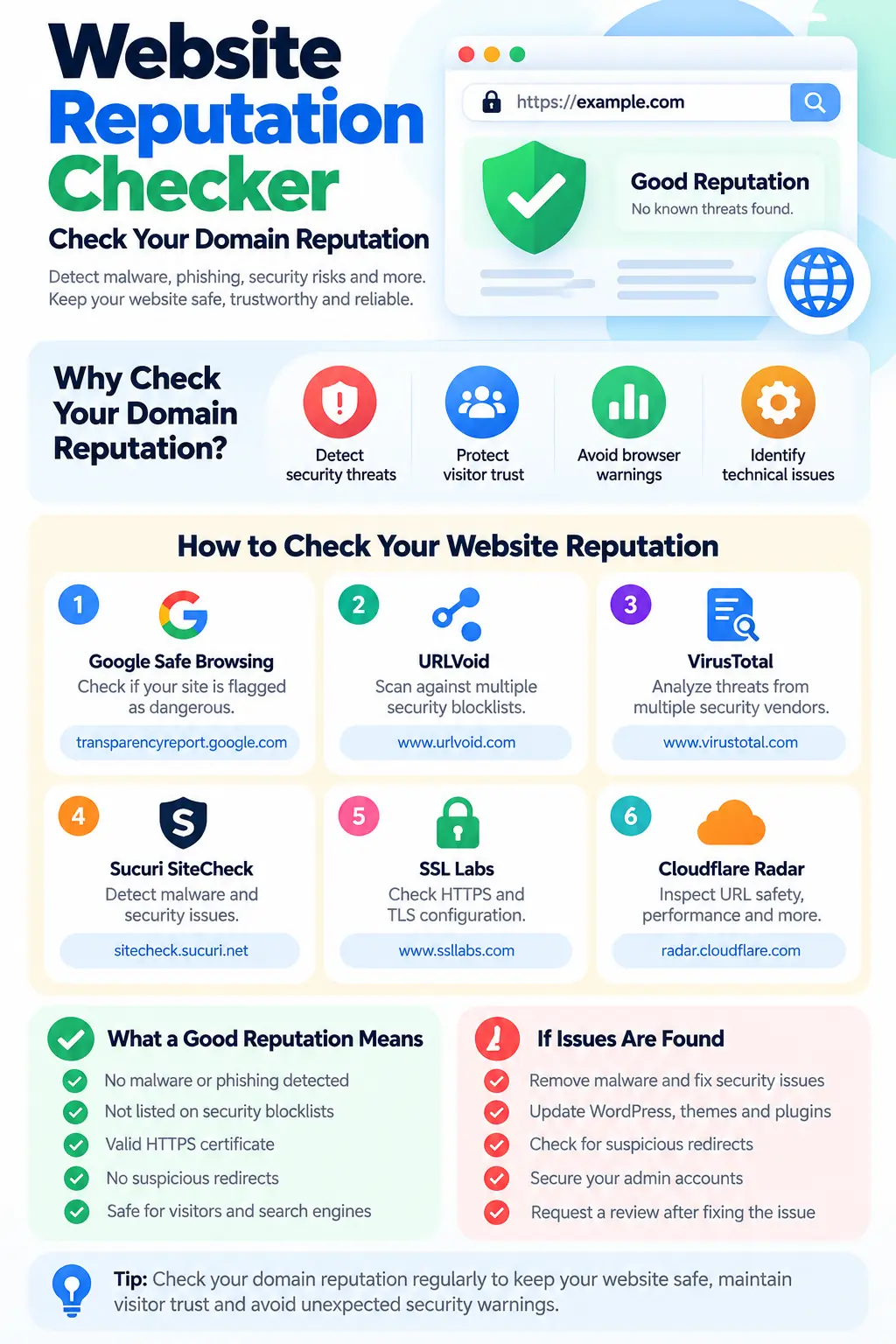
You can investigate a domain using a few reputable, publicly available services. Each one examines different information, so it is useful to compare results.
Step 1: Check Google Safe Browsing
Tool: Google Safe Browsing Site Status
Enter your domain or URL to see whether Google’s Safe Browsing service currently identifies it as dangerous.
This is a useful starting point when investigating browser safety warnings or concerns about phishing and malware.
If Google reports no unsafe content, that is encouraging, but it does not mean every page has been examined or that the website is free from all vulnerabilities.
Step 2: Check multiple security blocklists
Tool: URLVoid Website Reputation Checker
URLVoid checks a domain against multiple blocklist and reputation services. Its report can help you identify whether participating security sources have associated the domain with potentially malicious activity.
Compare the individual detections rather than treating the number of flagged sources as a definitive verdict. Security databases can disagree, and false positives are possible.
Step 3: Review the domain with VirusTotal
Tool: VirusTotal Domain and URL Analysis
VirusTotal aggregates threat intelligence from multiple security vendors and provides information about domains, URLs, and files. Its reports can help you investigate detections, related indicators, and previous analyses.
Pay attention to the specific detection, the source reporting it, and the date of the analysis. A report from several months ago may not reflect the current state of your website.
Step 4: Scan for visible malware indicators
Tool: Sucuri SiteCheck
Sucuri SiteCheck can help identify certain remotely visible malware indicators, blacklist listings, and other website security concerns.
A remote scan cannot inspect every server file, database record, authenticated page, or administrator account. Use its findings as a starting point for a deeper investigation when necessary.
Step 5: Review HTTPS and TLS configuration
Tool: Qualys SSL Labs Server Test
HTTPS protects information exchanged between a visitor’s browser and your website when correctly configured. SSL Labs examines aspects of your server’s TLS configuration and certificate deployment.
A valid certificate is important, but it does not prove that your website is trustworthy, free of malware, or protected against application vulnerabilities.
Step 6: Inspect your website’s public behavior
Tool: Cloudflare Radar URL Scanner
Cloudflare Radar’s URL Scanner can provide information about a URL’s security, performance, technology, and network characteristics. It can help you investigate redirects, loaded resources, and other browser-visible behavior.
Be mindful of privacy before submitting a URL to any public scanner. Reports may be publicly accessible, so do not submit private staging URLs, password-reset links, secret tokens, or confidential pages.
What do website reputation results mean?
Reputation tools may use different labels and scoring systems. There is no universal domain reputation score shared by all providers.
The following table explains how to interpret common outcomes.
| Result | What it may indicate | What to do |
|---|---|---|
| No threats detected | The scanner did not identify a known threat in its checks | Continue routine security monitoring |
| Phishing detected | The domain or a page may be associated with credential theft or deception | Investigate immediately and review affected pages |
| Malware detected | A scanner identified suspicious or malicious content | Check files, plugins, themes, database entries, and redirects |
| Listed on a blocklist | A participating security source has flagged the domain | Review the source’s evidence and removal process |
| Suspicious behavior | A scan identified activity that warrants investigation | Examine scripts, external resources, redirects, and recent changes |
| Unknown or unrated | The service lacks a clear verdict or sufficient data | Check other services and review the site manually |
| Conflicting results | Different services reached different conclusions | Investigate each detection individually rather than averaging the verdicts |
An unrated domain is not necessarily dangerous. It may be new, rarely visited, or absent from the service’s available data.
Likewise, a single detection does not automatically prove that your entire website is malicious. It does, however, deserve investigation.
What affects website reputation?
Several factors can influence how security services, visitors, and business partners perceive your domain.
Website security
Outdated software, weak passwords, exposed administrative interfaces, vulnerable plugins, and compromised hosting accounts can put a website at risk.
For WordPress websites, keep the core software, themes, and plugins updated. Remove extensions you no longer use, enable strong authentication, and maintain backups that you can restore.
Malware and phishing reports
A website may be flagged if it hosts malicious downloads, imitates another organization to steal credentials, or redirects visitors to harmful destinations.
Sometimes attackers compromise a legitimate website without the owner’s knowledge. Google notes that many unsafe websites it identifies are legitimate sites that have been compromised.
Suspicious redirects
Unexpected redirects can damage visitor trust and trigger security investigations. Review your redirects, server rules, WordPress settings, and third-party scripts if visitors are sent to unfamiliar destinations.
Domain and hosting configuration
DNS errors, expired certificates, misconfigured servers, and exposed services can affect reliability and security. These problems do not all mean a domain has a bad reputation, but they can indicate issues that should be resolved.
Content and business practices
Visitors also evaluate whether a website clearly identifies its publisher, provides accurate information, explains its policies, and delivers what it promises.
Security scanners generally cannot determine whether every claim on a website is honest or whether a business treats its customers fairly. Technical safety and editorial or commercial credibility require different forms of assessment.
How to improve your website reputation
Improving your domain reputation starts with identifying the actual problem. There is no universal action that instantly makes every reputation service trust a domain.
1. Fix security problems before requesting a review
If a scan identifies malware or phishing, investigate the affected files and pages. Remove malicious code, patch vulnerable software, change exposed credentials, and look for the original entry point.
Simply deleting a suspicious file may not solve the problem if an attacker still has access to your website.
2. Keep WordPress and its extensions updated
WordPress websites often rely on themes, plugins, and external libraries. A vulnerability in one component can affect the security of the entire installation.
Use reputable extensions, remove unused components, monitor security advisories, and test updates before deploying them on critical websites.
3. Secure administrator accounts
Use unique passwords, enable multi-factor authentication where available, and restrict administrator access to people who need it. Review user accounts periodically and remove access that is no longer required.
4. Use HTTPS and maintain your certificates
Ensure that your certificate is valid and that HTTP requests redirect appropriately to HTTPS. Review mixed content and avoid exposing sensitive information through insecure connections.
Remember that HTTPS protects connections; it does not guarantee the honesty or safety of the website itself.
5. Review external scripts and advertising
Audit the third-party resources loaded by your website. Remove unknown scripts, investigate unexpected pop-ups, and make sure advertising or analytics integrations have not introduced harmful redirects.
For WordPress sites, review both plugin-generated code and scripts added through themes or custom snippets.
6. Make your website transparent
Publish accurate contact information, identify the organization or person responsible for the site where appropriate, and provide clear privacy and service policies.
Transparency cannot replace technical security, but it can help visitors understand who operates the website and what they can expect.
7. Request a review when a warning is incorrect
If you have cleaned a compromised site and Google Safe Browsing still displays a warning, use the appropriate review process in Google Search Console. Google explains that website owners can request a malware review after cleaning the affected site.
Other security vendors have their own reporting and appeal procedures. Follow the instructions of the service that issued the detection and provide evidence when requested.
Do not expect every provider to remove a listing at the same time. Their databases and review schedules can differ.
8. Monitor your domain regularly
Schedule periodic checks and investigate unexpected changes. For a business-critical website, combine external reputation checks with server logs, security monitoring, backups, vulnerability management, and alerts from your hosting provider.
The goal is to detect problems early and understand why they occurred, not simply to obtain a clean scan.
Website reputation vs. SEO: What’s the difference?
Website reputation and search engine optimization are related, but they measure different things.
SEO focuses on helping search engines discover, understand, and rank relevant content. Website reputation checking focuses on investigating safety signals, known threats, and other indicators that may influence whether people or security services trust a domain.
A website can rank well in search results and still have a security vulnerability. A technically secure website can also struggle to attract organic traffic because its content does not satisfy search intent or its pages are difficult to discover.
For a broader understanding of search visibility, explore SEO, GEO, and AEO: How Search Optimization Is Evolving. These approaches address discoverability across search engines and AI-powered experiences, while reputation checks help you investigate a different set of concerns.
You can also explore these SEO techniques and practical optimization strategies to strengthen your website’s organic visibility.
The key is to treat security, credibility, and discoverability as complementary parts of website management rather than interchangeable measurements.
Does website reputation affect SEO?
There is no single public website reputation score that determines your Google rankings.
However, security problems can affect search visibility and user experience. Google may show warnings for sites it identifies as dangerous, and compromised pages may need to be cleaned up. Website owners can use Google Search Console to investigate security issues and request reviews when appropriate.
Other reputation factors, such as customer reviews or brand recognition, should not automatically be interpreted as direct Google ranking signals. Their effects depend on the situation, and a third-party reputation score is not a substitute for Google’s own systems.
Focus on what you can verify: secure your website, publish useful content, maintain accurate information, improve usability, and investigate actual security warnings.
Website reputation and AI discovery
As websites become sources for AI-powered search and assistants, publishers have additional reasons to make their content accessible, understandable, and attributable to a clear source.
For example, well-structured HTML, descriptive page titles, accurate metadata, accessible links, and consistent organization can help software interpret website content. These practices do not guarantee that an AI system will cite or recommend your website, but they can improve the clarity and accessibility of the information you publish.
If you operate a WordPress website, these resources may help:
- WordPress Markdown: Make Your Website Content Available in Markdown — learn about serving content in a format that can be easier for compatible tools and systems to consume.
- SimplyIrfan AI Content Discovery — explore an approach to exposing structured information about your website and its content for discovery.
Content accessibility and website reputation are separate concerns. Publishing Markdown or discovery metadata does not certify a domain as safe, establish editorial trustworthiness, or remove a malware warning. These features should complement—not replace—security maintenance and accurate publishing practices.
Frequently asked questions
What is a website reputation checker?
A website reputation checker is a tool that helps investigate a domain or URL using information such as security blocklists, malware indicators, phishing reports, or other available signals. The exact checks vary by provider, and no single tool can establish every aspect of a website’s trustworthiness.
How can I check my domain reputation for free?
Start with Google Safe Browsing, then compare the results with URLVoid, VirusTotal, and Sucuri SiteCheck. Use SSL Labs to review HTTPS and TLS configuration.
These services provide different types of information, so review the underlying findings rather than relying on one overall score.
Why does my website show a bad reputation?
Possible reasons include malware, phishing content, suspicious redirects, a compromised page, or a listing in a security provider’s database. A false positive or outdated report is also possible.
Check which service issued the warning, review its evidence, inspect your website, and follow the relevant remediation or appeal process.
Does HTTPS mean my website is safe?
No. HTTPS encrypts the connection between the browser and your website, helping protect data in transit. It does not prove that your content is legitimate, that your application is free of vulnerabilities, or that your server has not been compromised.
How often should I check my domain reputation?
For an ordinary website, periodic checks alongside routine security maintenance are a reasonable starting point. Websites that handle payments, user accounts, downloads, or sensitive information may need more frequent monitoring and additional security controls.
Also investigate immediately if browsers display warnings, visitors report unexpected redirects, or your hosting provider detects suspicious activity.
Can a new domain have a good reputation?
Yes. A new domain is not inherently unsafe. However, it may have limited history or no established rating in some reputation databases. An unknown or unrated result should not be interpreted as either proof of safety or evidence of malicious activity.
Can I improve my reputation by changing my domain name?
Changing a domain name does not resolve the underlying problem if the website remains compromised or continues the same harmful behavior. It can also disrupt existing links, brand recognition, and search visibility.
Identify and fix the cause first. If a domain is incorrectly flagged, use the appropriate review process rather than assuming a new domain is necessary.
Final thoughts
Your domain reputation is worth monitoring because website security, visitor confidence, and online credibility all contribute to a reliable web presence.
Start with a few reputable checkers, compare their findings, and investigate specific warnings instead of chasing a perfect score. Keep your software updated, protect administrator accounts, review external scripts, maintain HTTPS, and establish a process for responding to security incidents.
Most importantly, remember that a clean reputation report is evidence from a particular check, not a guarantee that your website is safe or trustworthy. Combine external checks with regular maintenance, accurate content, transparent practices, and ongoing monitoring to build a website that visitors can rely on.
Helpful resources
- Google Safe Browsing — Google’s website safety service.
- Google Safe Browsing Site Status — investigate whether Google currently flags a domain as dangerous.
- URLVoid — compare a domain against multiple reputation and blocklist sources.
- VirusTotal — review aggregated threat intelligence for domains and URLs.
- Sucuri SiteCheck — check for certain remotely detectable website security issues.
- Qualys SSL Labs — evaluate HTTPS and TLS configuration.
- Cloudflare Radar URL Scanner — inspect a URL’s security, performance, technology, and network characteristics.