
Facebook has been a major part of social media for years. People use it to share photos, keep up with friends, join groups, follow businesses, watch videos, organize events, and discover what is happening in their communities.
But not everyone wants to use Facebook for everything. Some people prefer a simpler feed, others want more privacy, and many are looking for platforms built around specific interests rather than a mixture of personal updates, advertisements, recommendations, and viral content.
The good news is that there are plenty of alternatives to explore. Some focus on conversations, some are designed for visual discovery, and others offer dedicated spaces for communities, professional networking, or private communication.
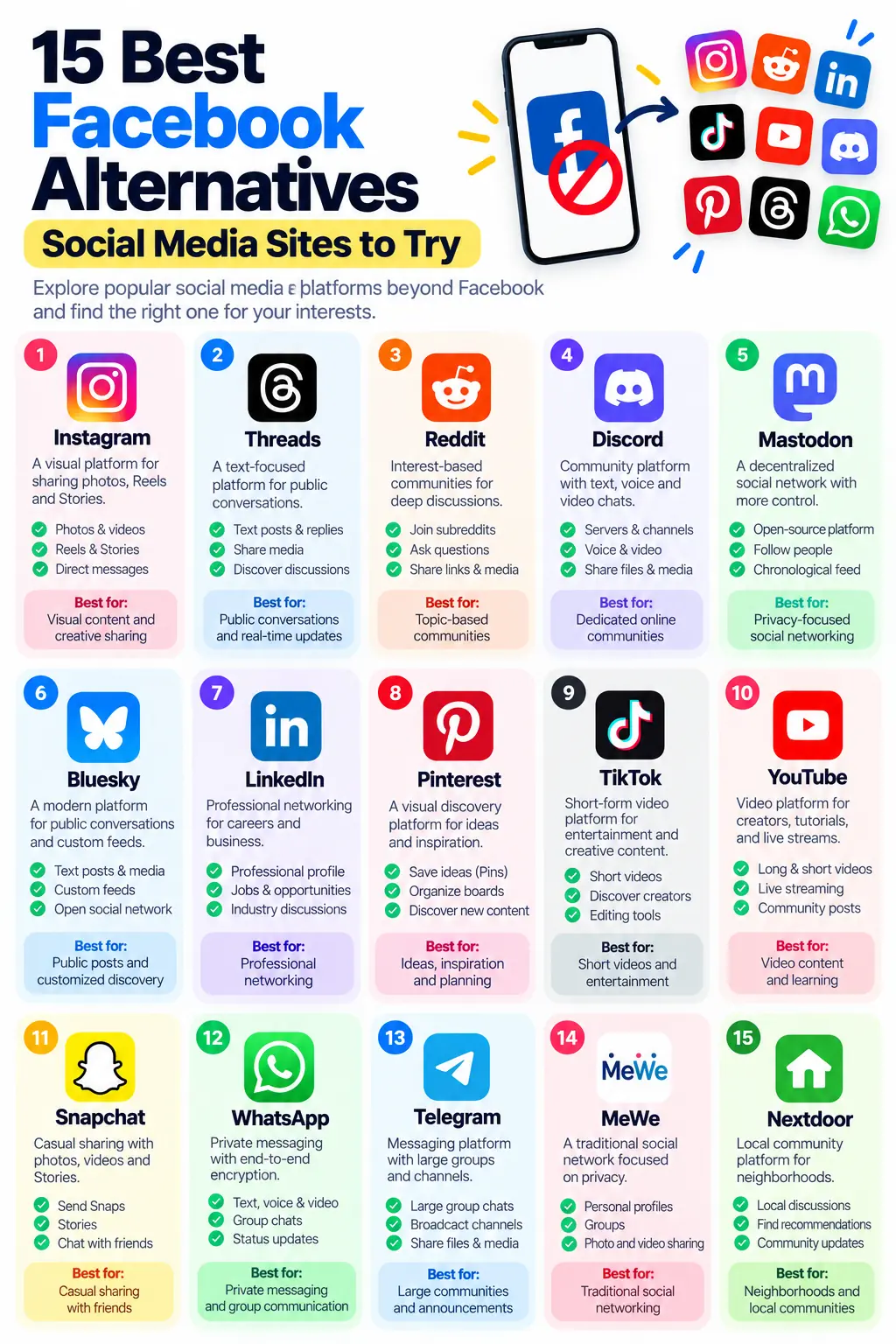
In this guide, we will explore the 15 best Facebook alternatives, explain what makes each platform different, and help you decide which social media site is worth trying based on your needs.
Whether you want to connect with friends, discover new communities, share creative work, grow a business, or step away from Facebook, you will find options worth considering.
Quick List: Best Facebook Alternatives
Here is a quick overview before we look at each platform in detail.
| No. | Platform | Best for | Closest Facebook feature |
|---|---|---|---|
| 1 | Photos, Reels, and Stories | Photo and video sharing | |
| 2 | Threads | Public conversations and discussions | Text posts and replies |
| 3 | Interest-based communities | Facebook Groups | |
| 4 | Discord | Dedicated online communities | Private groups and community chats |
| 5 | Mastodon | Decentralized social networking | Following people and public updates |
| 6 | Bluesky | Public conversations and custom feeds | Posts, replies, and discovery |
| 7 | Professional networking | Professional profiles and connections | |
| 8 | Ideas, inspiration, and visual discovery | Content discovery and sharing | |
| 9 | TikTok | Short videos and entertainment | Reels and video feeds |
| 10 | YouTube | Videos, creators, and live streams | Video sharing and community updates |
| 11 | Snapchat | Casual sharing with friends | Stories and direct communication |
| 12 | Private messaging and group chats | Messenger and group communication | |
| 13 | Telegram | Large groups and broadcast channels | Groups and Pages-style updates |
| 14 | MeWe | Friends, groups, and personal sharing | Traditional social networking |
| 15 | Nextdoor | Neighborhoods and local communities | Local groups and community updates |
These platforms do not all offer the same features. Some are full social networks, while others are better alternatives for a particular Facebook activity.
1. Instagram — Best for Photos, Reels, and Stories
Website: Instagram
Instagram is one of the most familiar alternatives to Facebook, particularly if your favorite part of social media is sharing photos, videos, and everyday moments.
Owned by Meta, Instagram is closely connected to the same broader social media ecosystem as Facebook. That makes it an easy option for people who already use Meta’s services but prefer a more visual experience.
Instead of centering the experience around a traditional personal timeline, Instagram emphasizes photos, short videos, Stories, Reels, and creator content.
Key features
- Share photos, videos, Stories, and Reels.
- Follow friends, creators, celebrities, and brands.
- Send direct messages and share posts privately.
- Explore content based on your interests.
- Create professional accounts for businesses and creators.
- Use live video and other interactive features where available.
Instagram can be especially useful for photographers, fashion creators, restaurants, travel bloggers, artists, and businesses that communicate through visual content.
For example, a small clothing brand can use Reels to demonstrate products, Stories to share updates, and posts to build a recognizable visual identity.
Who should try it?
Choose Instagram if you mainly use Facebook to share photos, follow creators, watch videos, or keep up with friends through visual updates.
One limitation: Instagram is not a complete Facebook replacement. Its community tools, events, and Marketplace work differently, and it remains part of Meta’s advertising and recommendation ecosystem.
2. Threads — Best for Public Conversations
Website: Threads
Threads is a text-focused social platform from Meta. It is designed for people who want to share opinions, join discussions, respond to current events, and follow conversations around their interests.
Think of it as a place where the written post and the replies often matter more than a carefully arranged photo grid.
You can publish short updates, attach media, reply to other users, repost content, and discover conversations through your feed. Threads also has connections with Instagram, making it easier for many Instagram users to establish a presence without starting entirely from scratch.
Key features
- Publish text posts and attach images or videos.
- Reply to other people and join public discussions.
- Repost and quote posts.
- Discover creators and conversations.
- Build a public presence around a hobby, brand, or professional interest.
- Use supported fediverse-sharing features where available.
Threads can be useful for bloggers, journalists, creators, businesses, and people who enjoy discussing technology, entertainment, sports, or everyday life.
For example, a tech blogger can publish a short opinion about a new product, ask followers what they think, and use the replies to start a discussion.
Who should try it?
Try Threads if you want a more conversation-oriented alternative to posting personal updates on Facebook.
One limitation: Threads is not designed to reproduce all of Facebook’s features, especially its traditional Groups, Events, and Marketplace experience. It is also part of Meta, so it may not be the right choice if your goal is to move away from Meta entirely.
3. Reddit — Best for Interest-Based Communities
Website: Reddit
Reddit is a social platform organized around communities called subreddits. Each community focuses on a particular subject, such as technology, gaming, photography, fitness, education, entertainment, or a local area.
Unlike Facebook, where personal profiles and friend connections often shape the experience, Reddit puts more emphasis on topics and discussions.
You can participate using a pseudonymous username rather than building a public profile around your real identity.
Key features
- Join communities dedicated to specific interests.
- Publish text posts, images, videos, and links where allowed.
- Ask questions and receive answers.
- Comment on discussions and vote on content.
- Follow communities rather than only individual users.
- Discover niche interests that may not have a large audience elsewhere.
One advantage of Reddit is the depth of its topic-based discussions. If you want advice about WordPress, computer hardware, books, travel, or a particular hobby, you can often find a community already discussing it.
For businesses and creators, Reddit can also provide insight into the questions and concerns people have about a subject. However, communities have their own rules, and promotional content may be restricted.
Who should try it?
Reddit is a strong choice if you use Facebook Groups to ask questions, discuss hobbies, seek recommendations, or connect with people who share your interests.
One limitation: Reddit is not primarily a friends-and-family network. Conversations can be highly useful, but the experience differs from maintaining a personal social feed.
4. Discord — Best for Dedicated Online Communities
Website: Discord
Discord began as a popular communication platform for gamers, but its use has expanded to study groups, creator communities, technology projects, fan clubs, professional teams, and other interest-based spaces.
Its main organizing feature is the server. A server can contain separate channels for different topics, making it easier to keep discussions organized.
For example, a web development community could have channels for WordPress, JavaScript, SEO, troubleshooting, announcements, and general conversation.
Key features
- Create or join servers built around specific communities.
- Organize discussions into topic-specific channels.
- Use text, voice, and video communication.
- Share files, images, links, and other media.
- Manage memberships and permissions.
- Use bots and integrations to support community activities.
Discord can be particularly useful when a community wants ongoing conversations rather than occasional posts that disappear into a busy feed.
A creator could use a Discord server to answer questions, share project updates, host community events, and give members a place to interact with one another.
Who should try it?
Choose Discord if you use Facebook Groups to maintain a close-knit community, coordinate a project, or have ongoing conversations with people who share your interests.
One limitation: Discord’s server-and-channel structure takes some getting used to. It is also not a direct replacement for Facebook’s public Pages, personal timeline, or Marketplace.
5. Mastodon — Best for Decentralized Social Networking
Website: Mastodon
Mastodon is a decentralized social network built around independent servers that can communicate with one another through a system called federation.
Rather than having every user depend on one central social network, Mastodon allows different communities to operate their own servers, often called instances.
Users on different compatible servers can follow one another and interact across the wider network.
Key features
- Publish text posts, images, videos, and links.
- Follow people and interact with their posts.
- Participate in communities hosted on different servers.
- Use chronological timelines for followed accounts.
- Choose a server based on its community and rules.
- Use open-source software and a federated network.
Mastodon may appeal to people who want more control over their social networking environment or prefer community-operated services.
It can also be useful for journalists, developers, open-source enthusiasts, artists, and people who want to follow public conversations without relying on a single company’s entire social ecosystem.
However, decentralization does not automatically mean complete privacy. The server you choose has its own policies, moderation practices, and responsibilities.
Who should try it?
Mastodon is worth exploring if you want public social networking with a decentralized structure and a chronological following feed.
One limitation: It has a different learning curve from Facebook. Choosing a server, finding people to follow, and understanding how federation works may take some time.
6. Bluesky — Best for Public Posts and Custom Feeds
Website: Bluesky
Bluesky is a social networking platform built around public conversations, short posts, replies, and customizable feeds.
It uses the AT Protocol, which is designed to support a more open social networking ecosystem. The service allows people to explore different feeds and ways of organizing content instead of relying exclusively on one universal timeline.
Bluesky is particularly suited to people who enjoy following discussions about technology, news, culture, entertainment, and other shared interests.
Key features
- Publish short text posts and attach media.
- Reply to and repost other users’ content.
- Follow people and participate in public discussions.
- Explore custom feeds built around different topics or preferences.
- Use moderation tools to manage interactions.
- Participate in an ecosystem built around the AT Protocol.
Custom feeds are one of Bluesky’s distinctive features. Depending on the feeds you choose, you can organize your social experience around particular subjects or types of content.
For example, someone interested in web development could follow developers and use feeds that surface relevant discussions.
Who should try it?
Bluesky is a good option if you prefer public conversations and want more choice in how you discover posts.
One limitation: Bluesky is not a complete substitute for Facebook’s private groups, local events, family updates, or Marketplace. It is also important to understand that public social networking is different from private messaging.
7. LinkedIn — Best for Professional Networking
Website: LinkedIn
LinkedIn is a professional networking platform designed for careers, business relationships, industry discussions, and professional content.
It shares some features with Facebook, including profiles, posts, comments, messaging, groups, and company pages. The difference is the context: LinkedIn is primarily organized around professional identity and work-related connections.
You can use it to connect with colleagues, follow companies, share expertise, discover opportunities, and build a professional reputation.
Key features
- Create a professional profile.
- Connect with colleagues and industry professionals.
- Publish articles, posts, images, and videos.
- Follow companies and industry leaders.
- Search for jobs and explore career opportunities.
- Participate in professional groups and discussions where available.
LinkedIn can be especially valuable for consultants, freelancers, recruiters, business owners, marketers, and job seekers.
For example, an SEO professional can share a case study, explain a search optimization technique, and connect with potential clients without mixing the content into a personal social feed.
Who should try it?
Choose LinkedIn if your main reason for using Facebook is to connect with business contacts, promote professional services, or discuss work-related subjects.
One limitation: LinkedIn is not intended to replace casual family updates, entertainment communities, or a general-purpose personal social network.
8. Pinterest — Best for Ideas and Visual Discovery
Website: Pinterest
Pinterest works differently from most traditional social networks. It is a visual discovery platform where users find, save, and organize ideas.
People use it to plan weddings, explore recipes, collect fashion inspiration, design rooms, discover travel destinations, learn crafts, and find ideas for personal or professional projects.
Instead of concentrating only on what friends are posting, Pinterest helps users discover content based on their interests.
Key features
- Save ideas as Pins.
- Organize Pins into themed boards.
- Discover visual inspiration through search and recommendations.
- Explore images, videos, tutorials, and product-related content.
- Create business accounts and access analytics.
- Use Pins to send visitors to relevant websites.
Pinterest can be useful for creators and businesses that publish visually appealing content. A home decor website, for instance, can create Pins that lead readers to room design guides, product comparisons, or practical tutorials.
It can also help bloggers build a discovery channel beyond conventional social feeds.
Who should try it?
Pinterest is a strong choice if you use Facebook to discover ideas, save useful posts, find recipes, explore designs, or share visual inspiration.
One limitation: Pinterest is not primarily a friends-and-family social network. Its strength is discovering and organizing ideas rather than maintaining a personal timeline.
9. TikTok — Best for Short Videos and Entertainment
Website: TikTok
TikTok is a short-form video platform known for entertainment, creative trends, tutorials, challenges, and creator content.
Its recommendation-driven video feed makes it possible to discover content from creators you have never followed. That is a major difference from social networks built mainly around a list of friends.
Key features
- Create and watch short-form videos.
- Discover creators and topics through a personalized feed.
- Use editing tools, effects, and supported music features.
- Comment, share, and interact with videos.
- Follow creators and explore live content where available.
- Use business and creator tools where eligible.
TikTok works well for demonstrations, quick tutorials, product showcases, humor, recipes, beauty content, and behind-the-scenes videos.
For example, a small business could demonstrate how its product works in a short video instead of relying entirely on a written Facebook post.
Who should try it?
Try TikTok if your favorite Facebook activity is watching Reels, sharing entertaining clips, discovering creators, or learning through short videos.
One limitation: TikTok’s experience is heavily centered on video. It does not reproduce Facebook’s full range of traditional Groups, Pages, Events, and personal updates.
10. YouTube — Best for Video Creators and Learning
Website: YouTube
YouTube is one of the most established platforms for sharing and discovering video content. It supports everything from short clips to long educational videos, livestreams, music, reviews, documentaries, and tutorials.
It also has community features that allow creators to interact with their audiences beyond uploading videos.
Key features
- Publish and watch long-form videos.
- Create and discover YouTube Shorts.
- Host livestreams and interact through live chat.
- Subscribe to channels.
- Comment on videos and participate in discussions.
- Use community posts and other creator features where available.
YouTube can be a valuable alternative for people who mainly use Facebook to watch videos or follow creators.
For businesses and publishers, it can also support long-term content discovery. A helpful tutorial may continue attracting viewers through YouTube search long after its original publication.
Who should try it?
Choose YouTube if you prefer video-based entertainment, education, product reviews, tutorials, or creator communities.
One limitation: YouTube is not a direct replacement for private friend networks or local Facebook Groups. Its central focus is video and channel-based content.
11. Snapchat — Best for Casual Sharing With Friends
Website: Snapchat
Snapchat is a communication and social platform built around photos, videos, Stories, and direct interactions.
It is especially popular with people who enjoy informal communication and sharing moments without turning every update into a permanent public post.
Key features
- Send photo and video Snaps.
- Share Stories with selected audiences or broader groups.
- Chat with friends.
- Use lenses, filters, and creative tools.
- Explore Spotlight and other discovery features.
- Share locations through Snap Map when the relevant settings are enabled.
Snapchat’s emphasis on camera-based communication makes it different from Facebook’s traditional timeline.
For example, friends can share a quick picture of an outing or use a private chat to coordinate plans without publishing a public status update.
Who should try it?
Snapchat is worth trying if you mainly use Facebook to keep in touch with friends, share informal moments, or send pictures and videos.
One limitation: Snapchat’s interface and disappearing-message features work differently from Facebook’s. Disappearing content is not a guarantee that recipients cannot save or capture it.
12. WhatsApp — Best for Private Messaging and Group Chats
Website: WhatsApp
WhatsApp is primarily a messaging platform, but it can replace several communication activities that people perform on Facebook and Messenger.
It supports private conversations, group chats, voice and video calls, and broadcast-style updates through Channels. Its Communities feature can also help organize related groups.
Key features
- Send text messages, photos, videos, and documents.
- Make voice and video calls.
- Create group chats.
- Share temporary Status updates.
- Follow Channels for announcements and news.
- Organize related groups through Communities.
WhatsApp can be useful for families, school groups, clubs, small businesses, and communities that want direct communication without maintaining a public social profile.
For example, a local club can use a group to coordinate activities and share announcements with members.
Who should try it?
Choose WhatsApp if the part of Facebook you value most is Messenger, family groups, direct communication, or sharing updates with people you already know.
One limitation: WhatsApp is not a complete public social network. It does not replace Facebook’s traditional feed, public Pages, broad content discovery, or Marketplace.
13. Telegram — Best for Large Groups and Broadcast Channels
Website: Telegram
Telegram combines messaging with large group conversations and broadcast channels. It is often used by communities, publishers, technology projects, creators, and organizations that want to distribute updates to an audience.
Channels are especially useful when an administrator wants to publish announcements that subscribers can read without every subscriber posting directly to the same feed.
Key features
- Send private messages.
- Create groups and large community chats.
- Publish updates through broadcast channels.
- Share files and media.
- Use bots and integrations.
- Organize discussions and announcements.
For example, a news publisher can use a Telegram channel to distribute article links, while a technology community can use a group to discuss updates and answer questions.
Telegram’s channels and groups can resemble certain Facebook communication features, but they work differently from a traditional Facebook Page or Group.
Who should try it?
Telegram is worth considering if you want to follow announcements, join large topic-based groups, or build a broadcast channel for a community.
One limitation: Telegram’s regular cloud chats are not end-to-end encrypted by default. Its Secret Chats use a different encryption model. Review the relevant privacy settings and understand the distinction before sharing sensitive information.
14. MeWe — Best for Traditional Social Networking
Website: MeWe
MeWe is a social networking platform that offers personal profiles, posts, groups, and direct communication. Its overall approach may feel more familiar to people who prefer a traditional social-networking experience.
Instead of being focused mainly on short videos or topic-based public discussions, MeWe emphasizes personal connections and community interaction.
Key features
- Create a personal profile.
- Share posts and media.
- Connect with other members.
- Join interest-based groups.
- Communicate with other users.
- Explore privacy-oriented account features.
MeWe may appeal to people who want a space for family updates, hobbies, clubs, and personal interests.
For example, a hobby community could use a group to share photographs, discuss projects, and keep members updated.
Who should try it?
Try MeWe if you want something closer to a conventional social network rather than a platform built around video, professional networking, or public microblogging.
One limitation: MeWe’s user community may be much smaller than Facebook’s in your location or interest area. You should check whether your friends and favorite communities are active there before making it your primary network.
15. Nextdoor — Best for Neighborhoods and Local Communities
Website: Nextdoor
Nextdoor focuses on local communities and neighborhood-level communication. It helps people connect around the places where they live and the services available nearby.
Depending on the area, people use it to discuss local events, ask for recommendations, share neighborhood updates, and connect with nearby residents.
Key features
- Participate in neighborhood discussions.
- Ask for recommendations for local services.
- Share relevant community announcements.
- Discover local events and activities.
- Discuss neighborhood concerns.
- Find local businesses and services where available.
Nextdoor can be particularly useful for people who use Facebook Groups to discuss neighborhood issues or seek recommendations from nearby residents.
For example, someone moving to a new area might ask neighbors for recommendations for a plumber, school, repair service, or local event.
Who should try it?
Nextdoor is worth exploring if your favorite Facebook feature is a local community group.
One limitation: Its usefulness depends on regional availability and local participation. It is not designed to replace a broad social network for connecting with friends around the world.
Which Facebook Alternative Is Best for You?
The best alternative depends on what you want to do after leaving Facebook. A platform with millions of users may still be the wrong choice if it does not support your favorite activity.
Use this guide to narrow down your options.
| If you want to… | Start with… |
|---|---|
| Share photos and Stories | Instagram or Snapchat |
| Join topic-based communities | Reddit or Discord |
| Discuss public topics | Threads, Bluesky, or Mastodon |
| Connect with professionals | |
| Find ideas and inspiration | |
| Watch and publish videos | YouTube or TikTok |
| Chat with family and friends | |
| Follow announcements and large communities | Telegram |
| Try a traditional social network | MeWe |
| Connect with nearby residents | Nextdoor |
| Explore decentralized social networking | Mastodon or Bluesky |
You do not need to join every platform on this list. Choose the one that solves the problem you actually have.
Which Facebook Alternative Is Best for Privacy?
Privacy is one reason people explore other social networks, but it is important to distinguish between a platform’s business model, its technical design, and its actual privacy settings.
No social network should be assumed to collect no data simply because it is smaller, decentralized, or describes itself as privacy-focused.
Here is a practical starting point:
- Mastodon: Explore it if you want a decentralized network. Remember that the server operator’s policies and moderation practices matter.
- Bluesky: Consider it if you want public conversations and customizable feeds. Public social posts are not private messages.
- Reddit: Consider it if you prefer topic-based communities and a pseudonymous username. Pseudonymity does not guarantee anonymity.
- Discord: Useful for controlled communities, but the privacy of a space depends on membership, permissions, and the platform’s policies.
- WhatsApp: Useful for private conversations because personal messages and calls are end-to-end encrypted by default, subject to the service’s features and settings.
Before choosing a platform, review its current privacy policy, account settings, data controls, and moderation model.
Also consider who you want to communicate with. A private group for a small set of people serves a different purpose from a public account designed to reach thousands of followers.
Can You Use Facebook Alternatives for Business?
Absolutely. Many businesses use several social platforms to reach different audiences, publish content, and communicate with customers.
However, the right combination depends on the type of business and the content you can produce consistently.
For bloggers and website owners
Pinterest can help people discover visual content, while YouTube can attract viewers through tutorials and educational videos. Reddit may be useful for understanding questions within a niche, provided you respect each community’s rules.
Threads, Bluesky, and Mastodon can support public conversations and professional networking around your subject.
For online stores
Instagram and TikTok can showcase products visually. Pinterest may help shoppers discover products and ideas, while YouTube can support demonstrations and detailed product reviews.
Choose platforms based on where your customers are and how they prefer to discover products.
For local businesses
Instagram can showcase work, WhatsApp can support customer communication, and Nextdoor may help eligible businesses reach nearby residents. LinkedIn is useful when your customers are other businesses or professionals.
For creators and communities
YouTube supports video publishing, Discord supports ongoing community discussions, and Telegram supports broadcast-style announcements.
For a broader content strategy, see our guide to Facebook campaign ideas for social media marketing. Many of the underlying principles—understanding the audience, choosing appropriate content, and measuring results—can also be applied to other platforms.
How to Choose the Right Alternative Before Leaving Facebook
Before deleting your Facebook account, take a moment to consider what you would lose and what you hope to gain.
1. Identify the features you actually use
Do you use Facebook mainly for family updates, Groups, video, Marketplace, Events, or business Pages?
Write down your three most important activities. Then select an alternative that supports those activities rather than switching simply because another platform is popular.
2. Check whether your friends are already there
A social network becomes useful when the people and communities you care about are active on it.
If your friends are not on a new platform, you may need to invite them or keep Facebook available while you transition.
3. Review privacy and account controls
Look at who can view your posts, how the service handles personal information, and whether you can download or delete your data.
Also check whether public posts, profile information, and activity are visible to people who do not follow you.
4. Consider how you want to discover content
Some platforms emphasize recommendations, while others emphasize followed accounts, selected feeds, or topic-based communities.
If you want fewer irrelevant posts, look for a service that gives you meaningful control over your feed. Do not assume every alternative is algorithm-free.
5. Start with one or two platforms
Trying to maintain accounts on 15 different platforms can quickly become exhausting.
Start with one platform for personal communication and another for your main interest, business, or content format. Spend a little time learning how each one works before adding more.
6. Keep a transition period
You do not have to delete Facebook immediately. You can create an account on an alternative, reconnect with important people, and move your community conversations gradually.
If you eventually decide to leave Facebook, review your account settings and save any information you want to retain before deactivating or deleting your account.
Is It Possible to Replace Facebook Completely?
For some people, yes. For many others, the practical answer is that it takes more than one platform.
Facebook combines personal profiles, Groups, Pages, Events, messaging, video, and Marketplace within a single service. Most alternatives specialize in only some of those functions.
For example, you might use:
- Instagram for photos and short videos.
- Reddit for interest-based discussions.
- WhatsApp for private conversations.
- Pinterest for visual discovery.
- LinkedIn for professional connections.
That combination can replace many common Facebook activities, but it also means managing multiple accounts and interfaces.
There is no requirement to make a complete switch. You can use a platform only for the feature you find useful, or reduce your Facebook activity without leaving altogether.
The most important question is not which platform has the longest feature list. It is which one helps you communicate, discover content, and participate in communities in a way that suits you.
Frequently Asked Questions
1. What is the best alternative to Facebook?
There is no single best option for everyone. Instagram is strong for photos and videos, Reddit for topic-based communities, Discord for ongoing group communication, and Mastodon for decentralized social networking. The best choice depends on which Facebook features you use most.
2. Which social media site is most similar to Facebook?
MeWe offers a more traditional social-networking experience, with profiles, posts, groups, and communication features. However, no alternative completely duplicates Facebook’s combination of Groups, Pages, Events, Messenger, and Marketplace.
3. Is there a social network without algorithms?
Some platforms offer chronological feeds or ways to choose how content is displayed. Mastodon provides a chronological home feed for followed accounts, while Bluesky offers custom feeds. However, platform features can change, and not every feed or discovery feature is chronological.
4. Which Facebook alternative is best for making friends?
Instagram, Threads, Reddit, Discord, and MeWe can all help people connect, but they work differently. Instagram is useful for visual socializing, Reddit for shared interests, Discord for ongoing communities, and MeWe for traditional social networking.
5. Which Facebook alternative is best for business?
It depends on the business. LinkedIn is particularly useful for professional networking and business-to-business marketing. Instagram and TikTok suit visual products, Pinterest supports visual discovery, and YouTube works well for tutorials and demonstrations.
6. Can I use these platforms without a Facebook account?
Most of the platforms listed here have their own registration systems and do not require a Facebook account. However, some services offer optional integrations or account connections, and their sign-up requirements may vary.
7. Are decentralized social networks better than Facebook?
Decentralized networks such as Mastodon offer a different model of social networking, with independent servers and federation. That can provide more choice, but it also introduces differences in moderation, account management, and discovery. Whether it is better depends on your priorities.
8. Should I delete Facebook after joining an alternative?
Not necessarily. Try the new platform first, find the people and communities you need, and decide whether it meets your expectations. If Facebook still serves a useful purpose, you can reduce your use rather than deleting your account.
Conclusion
The best Facebook alternatives are not necessarily the biggest social networks. They are the platforms that fit the way you want to communicate, share content, and discover people or ideas.
Instagram and Snapchat are good starting points for personal sharing. Reddit and Discord work well for communities. Threads, Bluesky, and Mastodon offer different ways to participate in public conversations. LinkedIn supports professional networking, Pinterest helps with visual discovery, and YouTube and TikTok are useful for video content. WhatsApp and Telegram cover different messaging and group-communication needs, while MeWe and Nextdoor serve more specific social and local purposes.
You do not have to choose only one. Try the platform that best matches your priorities, see whether the people you care about are active there, and build your social media routine around what is genuinely useful to you.
If you still use Facebook occasionally, our guides on how to use Facebook and Facebook demographics can help you understand the platform and its audience before deciding how much time you want to spend there.
Ultimately, the goal is not to join every social network. It is to find the right places to connect, learn, share, and participate online.
Helpful Sources