
Imagine a customer visiting your website, looking at a product, and leaving without placing an order. A few days later, they have a question about the product but cannot find the information they need. You have already paid to attract that visitor, yet the conversation never happens.
Now imagine giving that customer a simple way to message your business, ask questions, explore your products, and get help before making a decision.
That is where WhatsApp Business marketing can make a difference.
Instead of relying only on social media posts, advertisements, or email campaigns, businesses can use WhatsApp to communicate directly with customers who want to hear from them. A conversation can begin with a product question, continue with a recommendation, and eventually lead to an order or booking.
But effective WhatsApp marketing is not about sending promotional messages to everyone whose number you have. It is about making communication easier, providing useful information, and earning permission to stay in touch.
In this guide, you will learn how WhatsApp Business marketing works, how to set up your account, which features matter most, how to attract customers, and how to create your first marketing campaign—even if you are running a small business with a limited budget.
What Is WhatsApp Business Marketing?
WhatsApp Business marketing is the practice of using WhatsApp’s business tools to communicate with customers, promote products or services, answer questions, generate leads, and encourage repeat purchases.
It can include sending product updates to customers who have agreed to receive them, sharing a catalog, answering enquiries, sending appointment reminders, and helping customers complete a purchase.
For example, a clothing store could share a new collection with interested customers. A restaurant could answer questions about its menu and accept enquiries about bookings. A consultant could use WhatsApp to respond to potential clients and arrange appointments.
The important distinction is that WhatsApp marketing is not limited to promotional broadcasts. Customer support, product discovery, follow-ups, and after-sales communication can all contribute to the customer relationship.
WhatsApp offers a dedicated WhatsApp Business app for small businesses and the WhatsApp Business Platform for businesses that need more advanced messaging integrations and automation.
Official source: About WhatsApp Business
Why Should Small Businesses Use WhatsApp for Marketing?
WhatsApp can be useful when customers prefer a conversation over filling out a long form or waiting for an email response.
It is particularly practical for businesses where customers need to ask questions before purchasing.
1. Direct communication with customers
A customer can message your business to ask about prices, availability, delivery, opening hours, or product details. You can respond in the same conversation rather than sending them through several pages of a website.
This can be helpful for local businesses, service providers, online sellers, and consultants.
2. A familiar way to ask questions
Some customers are comfortable browsing a website but prefer asking a person before they buy. WhatsApp gives them a convenient place to ask questions and receive assistance.
A useful conversation can also reveal why customers hesitate to purchase. If several people ask about the same feature, delivery option, or price, you have learned something you can use to improve your website and product descriptions.
3. Product discovery through catalogs
The WhatsApp Business catalog allows eligible businesses to showcase products or services with images and details. Customers can browse the available offerings and ask questions about individual items.
Instead of sending a different photograph and description every time someone asks what you sell, you can maintain a catalog and share relevant items directly in a chat.
4. More personal customer service
A customer who has already purchased from you may need help with delivery, product use, a booking, or a follow-up question.
Responding through the same conversation can make the experience simpler and more personal. It also gives your business an opportunity to build trust beyond the initial sale.
5. Support for repeat purchases
If a customer has chosen to receive relevant updates, you can tell them about a new collection, a restocked product, or a suitable offer.
The goal is not to send a promotion every day. It is to communicate when you have something genuinely useful to share.
WhatsApp Business App vs. WhatsApp Business Platform
Before starting, choose the right version for your business. The two options serve different needs.
| Feature | WhatsApp Business app | WhatsApp Business Platform |
|---|---|---|
| Best for | Small businesses and individual operators | Growing businesses and larger teams |
| Setup | Install the app and configure your profile | Integrate through Meta’s platform or an authorized solution provider |
| Customer conversations | Managed through the app and supported linked devices | Can be managed through connected business software |
| Automation | Basic greetings, away messages, and quick replies | More advanced automated workflows and integrations |
| Product catalog | Available in supported configurations | Can integrate with business systems and commerce workflows |
| Marketing | Available messaging and broadcast features vary by account and country | Supports approved business messaging under platform rules |
| Cost | Core app is free to download; some features may be paid | Pricing depends on message categories, markets, and provider or software costs |
You do not need the Platform just because you want to promote a product. Many small businesses can start with the free WhatsApp Business app and expand when their customer volume or automation needs increase.
The Platform is more relevant when you need multiple agents, CRM integration, automated customer journeys, or messaging at a larger scale.
Check the official WhatsApp Business website for the latest product options and availability.
How to Set Up WhatsApp Business for Marketing
A business account should do more than display your business name. It should help a potential customer understand what you offer and how to contact you.
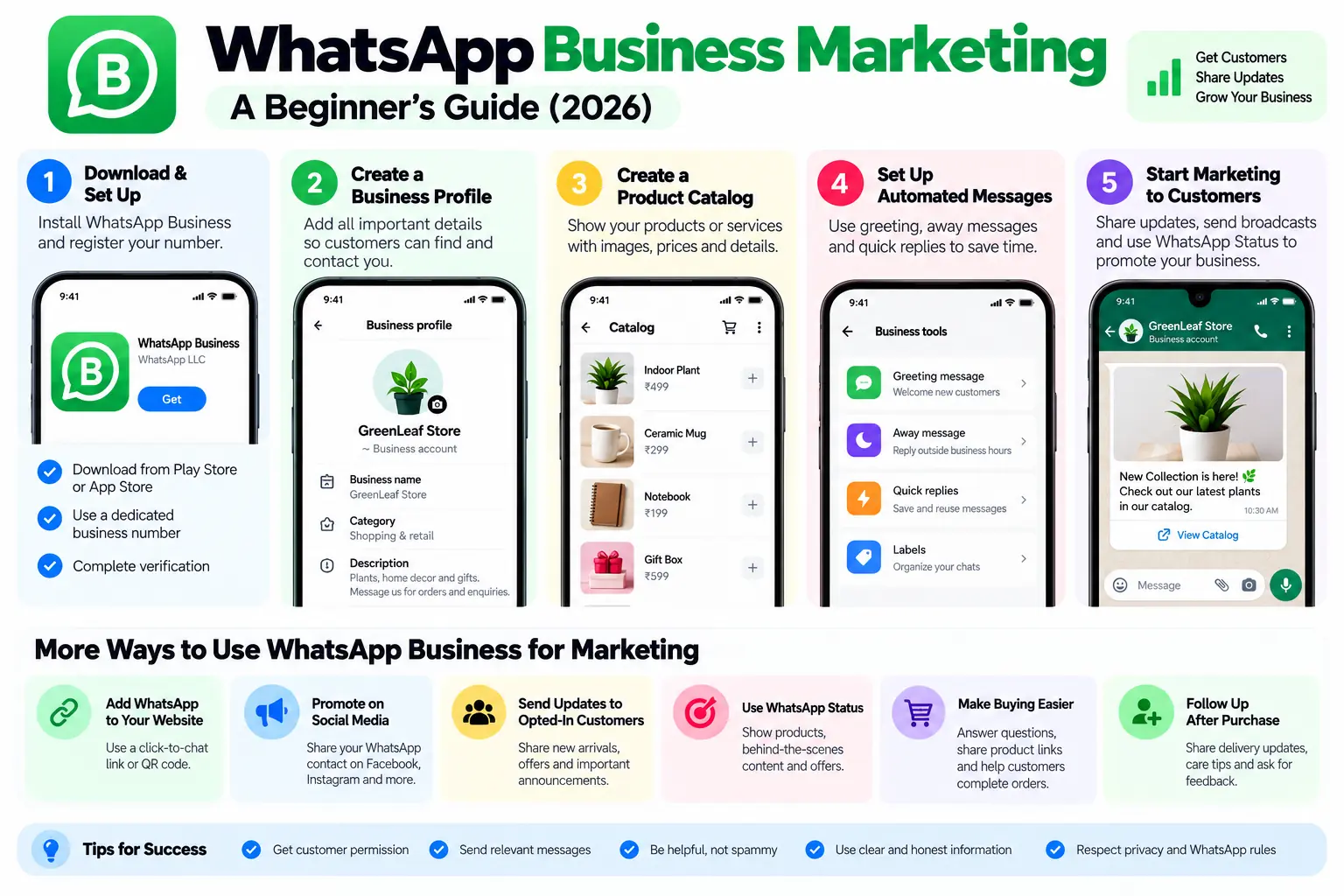
Step 1: Download the WhatsApp Business app
Download the official WhatsApp Business app from the Google Play Store or Apple App Store.
Follow the setup instructions to register your business number.
You can use a number dedicated to your business or, where supported, migrate an existing WhatsApp account. Remember that the same phone number cannot be used simultaneously for separate personal WhatsApp Messenger and WhatsApp Business app registrations.
If your personal and business conversations need to remain separate, using a dedicated business number can make account management easier.
Step 2: Create a complete business profile
Open your business profile settings and add the information customers need.
Include:
- Business name: Use the name customers recognize.
- Profile image: Choose a clear logo or business image.
- Business description: Explain what you sell or which service you provide.
- Business category: Select the closest available category.
- Business hours: Set realistic hours for customer support.
- Address: Add your location if customers visit your premises.
- Email and website: Include the appropriate contact details and website link.
Avoid vague descriptions such as “Best service at the best price.” Tell people what you actually do.
For example, a local bakery might write: “Fresh cakes, pastries, and custom celebration cakes. Message us about flavors, prices, and pickup availability.”
A clear profile makes it easier for customers to decide whether they have reached the right business.
Official source: About your business profile
Step 3: Create a product or service catalog
If you sell products or offer services that can be described in advance, create a catalog.
Add a clear image, a descriptive title, and useful details. Where supported, include pricing, a product code, a website link, and other relevant information.
For a clothing store, a catalog item might include the product name, available sizes, color options, price, and ordering instructions.
For a consultant, it could list service packages, what each package includes, and how to request a quotation.
Keep the information accurate. If an item is out of stock or a price changes, update the catalog rather than allowing customers to make decisions using outdated details.
Customers can browse and share catalog items, giving your products another way to be discovered.
Official source: About catalog
Step 4: Set up greeting and away messages
You cannot always respond to every enquiry immediately. Automated messages can acknowledge customers and explain when they can expect a reply.
A greeting message could say:
“Hi! Thanks for contacting ABC Store. We sell home accessories and gifts. Tell us what you are looking for, and we will help you find the right item.”
An away message could say:
“Thanks for your message. Our support hours are Monday to Saturday, 9 AM–6 PM. We will reply during our next business hours.”
Use realistic expectations. Do not promise an instant response if your business cannot deliver one.
Step 5: Prepare quick replies
Quick replies let you save answers to questions you receive frequently.
You might create shortcuts for:
- Product prices and availability
- Delivery charges and estimated delivery times
- Return and exchange policies
- Business opening hours
- Appointment booking instructions
- Payment methods
Quick replies save time without requiring you to write every answer from scratch. Review each response before sending it, particularly when the customer’s situation is different from the usual case.
Step 6: Create a simple customer follow-up process
Think about what should happen after someone contacts your business.
For example:
- A new customer asks about a product.
- You answer the question and share the relevant catalog item.
- The customer places an order.
- You confirm the order and provide any necessary updates.
- After delivery, you offer support and ask for feedback when appropriate.
This process helps you deliver a consistent experience without turning every conversation into a sales pitch.
Seven WhatsApp Business Marketing Strategies for Beginners
Once your account is ready, you need a practical way to attract customers and give them a reason to contact you.
1. Add WhatsApp to your website
Your website can be a valuable source of relevant enquiries. Add a WhatsApp contact link to pages where visitors are likely to have questions.
Useful locations include:
- Contact and support pages
- Product and service pages
- Booking pages
- Frequently asked questions
- Website headers or footers
- Order assistance pages
A WhatsApp link should make it clear what happens when someone clicks it.
For example, a product page could display: “Have a question about this product? Message us on WhatsApp.”
You can create a WhatsApp click-to-chat link using this format:
https://wa.me/COUNTRYCODENUMBERReplace COUNTRYCODENUMBER with your full phone number, including the country code but without the plus sign, spaces, or punctuation.
For an Indian number, the country code is 91. Use your actual business number in the link. Never publish a private number unless you intend to use it for business enquiries.
You can also create a QR code that opens the chat link and place it on packaging, menus, printed materials, or a storefront.
2. Promote your WhatsApp contact on social media
Your audience may already discover your business through Instagram, Facebook, or other social platforms.
Make it easy for interested people to start a conversation by adding a WhatsApp contact option where supported.
Instead of posting only “Contact us,” tell people why they might want to message you.
For example:
“Need help choosing the right size? Message us on WhatsApp, and we will help you compare the options.”
This is more useful than a generic call to action because it tells the customer what assistance is available.
You can also link WhatsApp to relevant campaigns on your social accounts. Keep the message consistent with the page or advertisement that brought the customer to you.
3. Use WhatsApp Status to showcase products
WhatsApp Status can be useful for sharing short updates with people who already have a connection to your business.
You might post:
- New product arrivals
- A behind-the-scenes look at your work
- Short product demonstrations
- Seasonal offers
- Customer-approved testimonials
- Frequently asked questions
- Available appointment slots
A clothing retailer could show a new collection, while a bakery could post photographs of the day’s fresh products.
Avoid turning every Status update into an advertisement. Useful information, demonstrations, and authentic glimpses of your work can give people a reason to pay attention.
Make sure you have permission to use customer photographs, testimonials, or other personal information.
4. Send relevant marketing messages to opted-in customers
Messages can be effective when they reach people who are genuinely interested in what you offer.
For example, a bookstore might tell customers about a new release in a genre they previously expressed interest in. A salon could send an appointment reminder to a customer who booked a service.
Before sending marketing messages, make sure customers have clearly agreed to receive them and understand what kind of updates they will receive.
Keep messages relevant, identify your business, and make it easy for people to stop receiving promotional communication.
WhatsApp’s marketing-message and business-broadcast features vary by market and account. Some newer features are paid and may not be available to every business.
Official sources:
5. Make the buying process easier
A customer might be interested in your product but still have questions about size, compatibility, delivery, payment, or availability.
WhatsApp can help you resolve those questions in one conversation.
For example, an electronics seller could ask what device the customer owns before recommending an accessory. A travel service could explain available packages and collect the information needed to prepare a quotation.
Use the conversation to help customers make informed decisions. Do not pressure people into purchasing products they do not need.
If your business accepts orders through WhatsApp, clearly explain the final price, delivery terms, payment process, and return policy before confirming the order.
6. Follow up after a purchase
Marketing does not end when a customer pays.
A thoughtful follow-up can help customers use their purchase successfully and give them a clear way to ask for support.
Depending on the business, you could send:
- An order or delivery update
- Setup instructions
- A request for feedback
- A reminder about a scheduled appointment
- Relevant maintenance information
- Information about a complementary product
Make the follow-up useful and proportionate. A customer who buys one item does not necessarily want frequent offers for unrelated products.
7. Use WhatsApp with your other marketing channels
WhatsApp works best when it has a clear role in your broader marketing strategy.
Your website might attract visitors through search engines. Social media might introduce people to your brand. Email might provide longer updates. WhatsApp can then help interested customers ask questions or receive support.
For example, a business could publish a detailed buying guide on its website and offer a WhatsApp contact option for readers who need help choosing a product.
For more ideas, read our guide to digital marketing strategies for 2026.
The aim is not to move every customer into WhatsApp. It is to offer a useful communication channel where it fits the customer’s needs.
How to Create a WhatsApp Marketing Campaign
A marketing campaign does not need to be complicated. Start with one clear objective and a specific audience.
Let’s say you run a small online store and want to promote a new collection.
Step 1: Decide what success looks like
Choose one primary goal, such as:
- Generating product enquiries
- Increasing bookings
- Announcing a new product
- Encouraging repeat purchases
- Bringing interested customers back to your store
Avoid measuring success only by how many messages you send. The goal is to generate useful responses and business results.
Step 2: Choose the right audience
Identify customers who have agreed to receive relevant updates.
You might select customers who previously asked about the product category or opted in to receive new-arrival announcements.
Do not assume that having someone’s phone number means you have permission to send them marketing messages.
Step 3: Write a message that provides value
A useful marketing message answers three questions:
- Why are you contacting the customer?
- What is relevant or useful to them?
- What can they do next?
For example:
“Hi! We have added new cotton shirts to our summer collection. You can view the available colors and sizes in our catalog. If you need help choosing a size, reply to this message and we will help.”
The message identifies the reason for contact, provides a next step, and offers assistance without creating unnecessary pressure.
Step 4: Add useful media or a clear action
Where the available messaging feature supports it, include a relevant product image, catalog link, website link, or action button.
Use images that accurately represent the product. Avoid exaggerated claims, misleading discounts, or stock photographs that make the item look different from what the customer will receive.
If you are using WhatsApp’s newer marketing-message or business-broadcast tools, follow the requirements shown in your account.
Step 5: Send at a reasonable time
Consider the customer’s location and normal business hours. A message sent at an inconvenient time may be ignored or annoy the recipient.
Do not send repeated reminders simply because someone has not replied. Silence is not an invitation to increase the frequency of your messages.
Step 6: Review the results
Depending on the messaging feature you use, available insights may include delivery, reads, replies, and other engagement information.
Look at the results in relation to your objective. If you wanted product enquiries, count meaningful enquiries rather than focusing only on the number of messages delivered.
Use what you learn to improve your next campaign.
A Simple WhatsApp Marketing Message Template
Here is a reusable template for a business announcement. Adapt it to your product, audience, and communication preferences.
Subject: New product announcement
“Hi! This is [Business Name].
We have just added [product or service] to our collection. You can see the details here: [link].
If you have any questions about pricing, availability, or which option is right for you, simply reply to this message and we will be happy to help.
If you no longer want to receive promotional updates from us, let us know.”
Only send this message to customers who have agreed to receive relevant marketing communications. Replace every placeholder before sending, and ensure that your opt-out process actually works.
WhatsApp Business Broadcasts: What Beginners Should Know
A broadcast lets a business send a message to multiple recipients without placing everyone into the same group conversation.
This distinction matters. In a normal group, members can see and interact with the group’s shared messages. A traditional broadcast sends the message as an individual conversation to each recipient.
WhatsApp Business has also introduced newer marketing messages and business broadcasts. These may offer features such as audience selection, scheduling, action buttons, and performance insights. Availability and pricing vary.
Do not assume every broadcast feature works the same way. Traditional broadcast lists have historically depended on recipients saving the sender’s number for delivery. Newer business-broadcast tools may have different requirements.
Before building a campaign around a specific feature, check the instructions and availability in your own app.
Official sources:
WhatsApp Business Labels and Customer Organization
As your business receives more messages, it becomes harder to remember which customers need a quotation, which orders are pending, and who requires a follow-up.
WhatsApp Business offers conversation-organization features such as labels or lists, depending on the version and rollout available to your account.
You can organize conversations into practical categories such as:
- New enquiry
- Interested customer
- Awaiting payment
- Order confirmed
- Ready for delivery
- Follow-up required
- Returning customer
For example, when someone asks for a quotation, you can place the conversation in a relevant category. Once they place an order, move it to the appropriate stage.
Keep the system simple. A handful of categories that you use consistently is more useful than dozens of labels that nobody maintains.
Also, remember that these tools help you organize conversations. They do not automatically provide a complete customer relationship management system, and you should handle customer information responsibly.
Official source: How to use labels
WhatsApp Business Marketing Mistakes to Avoid
WhatsApp can feel personal because it is a messaging channel. That is also why poor marketing practices can damage trust quickly.
1. Sending unsolicited bulk messages
Do not collect phone numbers from websites, directories, or unrelated groups and use them for unsolicited promotions.
People should understand what they are signing up for and be able to withdraw their permission. Unwanted messages can lead to blocks, complaints, and restrictions on your account.
2. Sending too many promotions
A customer who agrees to receive updates has not necessarily agreed to daily advertisements.
Set a reasonable communication schedule and prioritize messages that are relevant to the audience. If you have nothing useful to share, wait until you do.
3. Using misleading offers
Make sure discounts, product claims, delivery promises, and deadlines are accurate.
If a discount applies only to selected products or requires a minimum order, explain those conditions clearly.
4. Ignoring customer replies
Marketing should create conversations, not just deliver messages.
If you encourage customers to reply but cannot provide support, the campaign may create frustration rather than sales. Set realistic response expectations and arrange coverage for busy periods.
5. Using unofficial bulk-messaging tools
Be cautious about third-party tools that promise unlimited messaging, guaranteed delivery, or ways to bypass WhatsApp restrictions.
Unauthorized automation and spam can put your business number and customer relationships at risk. Use official tools and reputable providers, and verify their permissions and data practices before connecting them to your account.
6. Ignoring privacy
Treat customer phone numbers, order details, addresses, and conversation histories as private information.
Collect only what you need, limit access to authorized staff, and avoid sharing personal details with unrelated people or groups. If you use a third-party provider, review how it handles customer data.
WhatsApp Business Marketing Rules and Customer Consent
A successful campaign needs more than a good message. It must respect customer expectations and WhatsApp’s rules.
Before sending a promotion, make sure you have the appropriate permission and that the message is consistent with what the customer agreed to receive.
In practice:
- Tell customers what kinds of updates they can expect.
- Use clear, affirmative opt-in methods.
- Keep a record of consent where appropriate.
- Identify your business in marketing communications.
- Honor opt-out requests promptly.
- Avoid misleading claims and repetitive unwanted messages.
- Follow the applicable WhatsApp Business policies and local privacy and marketing laws.
If you use the WhatsApp Business Platform, additional rules may apply to approved message templates, messaging categories, customer-service windows, and pricing. Review the current documentation before automating campaigns.
Official resource: WhatsApp Business
How to Measure WhatsApp Marketing Results
A campaign can generate a large number of delivered messages without producing many enquiries or sales. That is why you should measure the outcome you actually want.
Here are useful metrics to consider:
| Metric | What it tells you |
|---|---|
| Qualified enquiries | How many people asked relevant questions about your product or service |
| Reply rate | How many recipients responded, where this information is available |
| Clicks | How many people followed a link or action, if tracked |
| Bookings or orders | Whether conversations resulted in a business outcome |
| Repeat purchases | Whether existing customers returned to buy again |
| Opt-outs and complaints | Whether your messages are unwanted or too frequent |
| Response time | How quickly your business handles incoming questions |
You do not need sophisticated analytics software to start. A simple spreadsheet can record campaign dates, audience segments, enquiries, orders, and revenue.
If you use tracked website links, apply UTM parameters where appropriate so that your analytics system can distinguish campaign traffic. Do not include personal customer information in tracking URLs.
Compare results across campaigns, but interpret them carefully. A campaign sent to a small group of highly interested customers may produce better sales than a much larger campaign sent to a less relevant audience.
A Practical 7-Day WhatsApp Business Marketing Plan
If you are starting from scratch, use this one-week plan to build a foundation without overwhelming yourself.
Day 1: Set up your business profile
Add your business name, logo, description, contact details, hours, and website. Check that all the information is accurate.
Day 2: Prepare your catalog
Add your main products or services, with clear images, descriptions, and current prices where supported.
Day 3: Create response templates
Prepare quick replies for your most common questions, including delivery, pricing, bookings, and returns.
Day 4: Add a WhatsApp contact link
Place a click-to-chat link on your website and relevant social profiles. Explain what customers can ask you.
Day 5: Publish a useful Status update
Share a product demonstration, helpful tip, new arrival, or behind-the-scenes update. Focus on giving people a reason to engage.
Day 6: Invite interested customers to opt in
Tell existing customers how they can receive relevant updates. Explain what type of messages you intend to send and how they can opt out.
Do not add people to a marketing list simply because they have purchased from you or contacted you once.
Day 7: Review and improve
Check incoming questions, response times, and the performance information available to you. Identify one thing to improve during the following week.
The objective is to establish a sustainable process. You can expand your marketing efforts after you understand what your customers actually find useful.
Frequently Asked Questions
1. Is WhatsApp Business marketing free?
The core WhatsApp Business app is free to download, but not every feature is necessarily free. Some newer business-broadcast or marketing-message options are paid and may be available only in selected markets. The WhatsApp Business Platform also has pricing and possible provider or software costs.
Check the current feature and pricing information for your account before planning a campaign.
2. Can I use my personal WhatsApp number for business marketing?
You can migrate an eligible number to WhatsApp Business, but you cannot use the same number for separate WhatsApp Messenger and WhatsApp Business app registrations at the same time. A dedicated business number can make it easier to separate work conversations from personal messages.
3. Can I send WhatsApp marketing messages to people who have not saved my number?
The requirements depend on the messaging feature. Traditional broadcast lists have historically required recipients to save the sender’s number for delivery. Some newer business-broadcast tools have different capabilities.
Regardless of the feature, you should have the appropriate customer permission and follow WhatsApp’s rules. Do not treat a technical ability to send a message as permission to send an unsolicited promotion.
4. Is WhatsApp Business suitable for small businesses?
Yes. It can be useful for retailers, service providers, restaurants, consultants, local businesses, and online sellers that need to communicate directly with customers.
Start with the basic app and expand to more advanced tools only when your business needs them.
5. Can WhatsApp Business help increase sales?
It can support sales by making it easier for customers to ask questions, explore products, receive assistance, and complete orders. Results depend on the relevance of your offers, the quality of your customer experience, and how effectively you manage conversations.
There is no guaranteed sales increase from simply installing the app.
6. What is the difference between WhatsApp Business and WhatsApp Business Platform?
The WhatsApp Business app is designed for small businesses managing conversations through the app. The WhatsApp Business Platform is intended for businesses that need more advanced integrations, automation, and messaging capabilities, often through connected software.
7. How often should I send WhatsApp marketing messages?
There is no universal schedule that suits every business. Start with occasional, relevant updates and observe customer responses. Let customer expectations, the nature of your product, and your consent process guide the frequency.
Avoid sending repeated promotions simply to stay visible.
8. Can I automate WhatsApp marketing?
Basic automation, such as greeting messages and away messages, is available in the WhatsApp Business app. More advanced automation can be built through the WhatsApp Business Platform and suitable integrations.
Choose automation that makes communication more useful. Always provide an appropriate route to human support when customers need it.
9. Can I use WhatsApp Status for marketing?
Yes. Status can be used to share product updates, useful tips, new arrivals, demonstrations, and other relevant content. Make sure the content is accurate and appropriate for the audience you intend to reach.
Helpful Official Sources
The following resources explain WhatsApp’s business tools and marketing features in more detail:
- About WhatsApp Business — learn about the app and its core features.
- WhatsApp Business app features — explore profiles, catalogs, quick replies, customer organization, and messaging tools.
- About your business profile — learn what information your business profile can display.
- About catalog — understand how to showcase products and services.
- How to create and send a marketing message — review the available marketing-message workflow.
- About marketing messages — check availability and how these messages work.
- How to use broadcast lists — learn about traditional broadcast lists.
- WhatsApp Business Platform — explore advanced business messaging and integration options.
Feature names, availability, and pricing can change, so use official documentation when making decisions about a live campaign.
Final Thoughts
WhatsApp Business marketing is most effective when it makes the customer experience easier.
Start with a complete business profile, a useful catalog, quick replies, and a clear way for customers to contact you. Then use Status updates, appropriate marketing messages, and thoughtful follow-ups to stay connected with people who want to hear from your business.
Do not measure success only by the number of messages you send. Measure whether customers receive useful answers, whether enquiries turn into orders, whether existing customers return, and whether people continue to trust your business.
You do not need a large marketing budget or complicated automation to begin. Start with one customer problem, make it easier to solve through WhatsApp, and improve the process as you learn.
The goal is not to send more messages. It is to make every business conversation more useful.