
If you have ever wondered whether your private messages are really private, you have probably come across Signal. It is a messaging app designed for people who want to communicate without making their conversations part of an advertising or data-tracking business.
Signal lets you send text messages, share photos and videos, exchange files, make voice and video calls, and participate in group conversations. What makes it different from many other messaging apps is its focus on privacy, end-to-end encryption, and an independent nonprofit funding model.
But is Signal actually secure? How does it work? Can you use it without sharing your phone number with everyone? And is it a good alternative to WhatsApp or Telegram?
This guide answers those questions in plain English, explains Signal’s main features, and walks you through setting up and using the app.
What Is Signal App?
Signal is a free, privacy-focused messaging application developed by Signal Messenger LLC and supported by the nonprofit Signal Foundation. It is available for Android, iPhone, and desktop computers.
The app uses end-to-end encryption by default for Signal messages and calls. This means the communication is encrypted on the sender’s device and can be decrypted by the intended recipient’s device. Signal’s service cannot ordinarily read the contents of those conversations.
According to Signal’s official website, the app does not rely on advertisements or tracking to support its service. Its development is funded through donations and grants.
Signal includes many features people expect from a modern messaging app:
- Private one-to-one conversations
- Group chats
- Voice messages
- Voice and video calls
- Photo, video, and document sharing
- Disappearing messages
- Usernames and phone-number privacy controls
- Desktop apps and linked devices
- Stickers, reactions, and other messaging tools
You do not need a paid subscription to use Signal’s core messaging and calling features. You will need an internet connection, and your mobile operator may charge you for data usage.
Official website: Signal.org
How Does Signal Work?
To understand Signal, it helps to understand the difference between ordinary messaging and end-to-end encrypted communication.
In a conventional messaging system, the provider’s ability to access message content depends on how the service handles encryption and stores its data. With end-to-end encryption, the message is protected so that only the communicating users’ devices hold the keys needed to read it.
Here is a simplified example.
Imagine you send a message to a friend through Signal.
- You write the message on your phone.
- Signal encrypts the message on your device.
- The encrypted message travels through Signal’s service to your friend’s device.
- Your friend’s device decrypts the message and displays it.
Someone intercepting the encrypted message should not be able to read its contents simply by capturing the transmitted data. Signal itself also cannot ordinarily decrypt your message.
Signal uses the open-source Signal Protocol for its encrypted communications. Its client and server source code is publicly available, allowing independent researchers to examine the implementation.
However, encryption does not make every part of communication risk-free. Someone who has access to your unlocked phone, compromises your device, or tricks you into sharing sensitive information may still access your conversations.
That distinction matters: secure messaging protects communication, but it cannot eliminate every security risk surrounding the people and devices involved.
For more information, see Signal’s official explanation: Is it private? Can I trust it?.
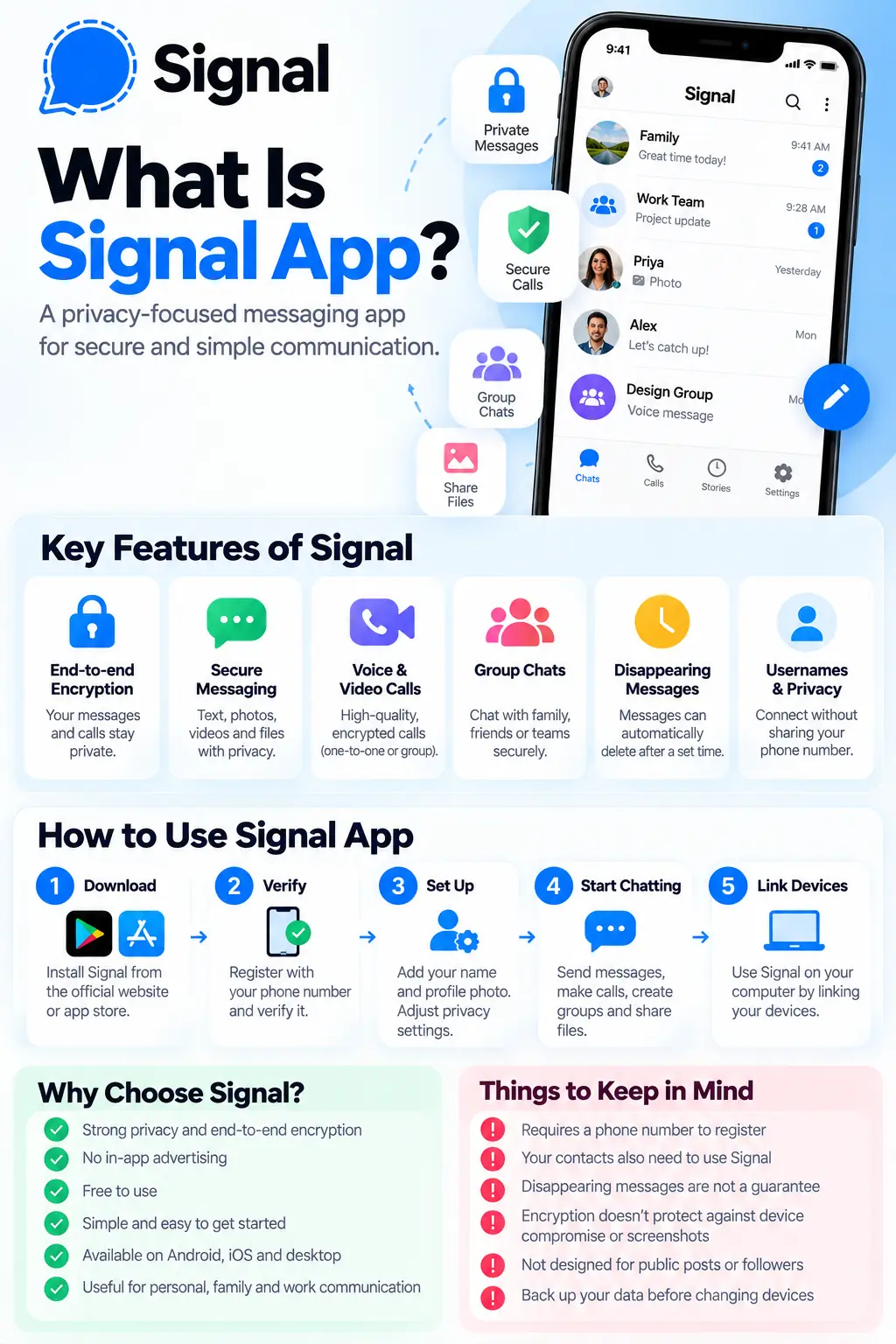
Key Features of the Signal App
Signal is not just a tool for sending encrypted text messages. It includes features for everyday communication, personal privacy, and group collaboration.
1. End-to-end encrypted messaging
End-to-end encryption is Signal’s defining feature.
Messages between Signal users are encrypted by default. You do not need to enable a separate private-chat mode before sending a message.
You can use Signal to send ordinary text, emojis, links, photos, videos, voice messages, and supported file attachments.
This is useful when discussing personal matters, sharing private documents, or simply communicating without wanting the service provider to have access to your message content.
Keep in mind that encryption does not stop a recipient from copying a message, taking a screenshot, or forwarding information outside the conversation.
2. Voice and video calls
Signal supports encrypted voice and video calls, including group calls.
You can call friends, family members, colleagues, or other Signal users through an internet connection instead of relying on traditional phone-call minutes.
Call quality depends on your internet connection, device, and network conditions. Mobile data charges may apply.
Signal also offers call links, which can make it easier to invite people to a call without creating a new group conversation for every meeting.
3. Group chats
Group chats allow multiple people to communicate in one conversation.
You can create groups for family members, friends, project teams, community activities, and other shared interests. Depending on the available group settings, administrators can manage membership and permissions.
Group conversations are end-to-end encrypted as well.
For businesses and teams, this can be useful for sharing updates or coordinating work. However, organizations that require centralized administration, extensive audit trails, retention policies, or enterprise compliance controls should evaluate whether Signal meets those requirements.
4. Usernames and phone-number privacy
One common concern about messaging apps is the need to share a personal phone number.
Signal still requires a phone number to register an account. However, its username and privacy features allow you to connect with people without necessarily giving them your number.
You can create a username and share it with someone who wants to contact you. Signal usernames are not public social-media handles in a searchable directory.
You can also adjust your phone-number privacy settings to control who can see your number and who can find you using it.
This is especially helpful when communicating with new contacts, participating in communities, or keeping your personal number separate from less familiar relationships.
Remember that using a username does not make your account completely anonymous. Registration still requires a phone number, and the person you communicate with may learn other information about you through your conversations.
For the latest instructions, consult Signal’s official phone-number privacy and usernames guide.
5. Disappearing messages
Signal lets you configure messages to disappear automatically after a selected period.
This feature can help reduce the amount of old conversation history stored on your devices. It may be useful for temporary discussions, routine coordination, or conversations containing information that does not need to remain available indefinitely.
You can set a timer for an individual conversation and, where supported, configure a default timer for new chats.
However, disappearing messages are not a guarantee that information will be permanently erased. Recipients may copy, photograph, or otherwise preserve the content before it disappears. Notifications and other device-level copies may also affect what remains visible.
Use disappearing messages as a conversation-management tool, not as a substitute for careful handling of sensitive information.
6. View-once media
Signal supports sending certain photos and videos as view-once media.
The recipient can open the item once in the intended viewing experience, after which it is removed from that view. This can be convenient when you want to share an image without keeping it in the normal conversation history.
Nevertheless, view-once media cannot guarantee that the recipient will be unable to preserve what they see. A second device, for example, could be used to photograph the screen.
Only share sensitive media with people you trust.
7. Stories
Signal includes Stories, allowing users to share temporary photos, videos, and other supported updates with selected connections.
Stories are designed to disappear after 24 hours. Their audience depends on the privacy settings you choose.
Unlike a public social network, Signal is primarily built around private communication rather than broadcasting content to a large public audience.
If you are exploring different social platforms, you may also find our guide to top social media apps useful for understanding how different apps serve different purposes.
8. Desktop apps and linked devices
Signal is available on supported desktop platforms, including Windows, macOS, and Linux.
You can link a computer to your existing Signal account so you can continue conversations from your desktop. This is convenient for people who spend much of their day working on a computer.
Because linked devices can access conversations, it is important to review the devices connected to your account.
If you no longer use a particular computer, remove it from your linked-device list. You should also protect your computer with a strong login password and keep its operating system updated.
9. Screen lock and privacy settings
Signal offers additional controls to help protect access to the app.
Depending on your device and version, you may be able to use screen lock, adjust notification previews, control phone-number discoverability, and manage other privacy settings.
These controls are important because encryption alone does not help if someone can simply pick up your unlocked phone and read your conversations.
Consider hiding message content from your lock-screen notifications if you frequently leave your phone on a desk, share living space with other people, or handle sensitive discussions.
10. Backups and chat transfers
Losing a phone can mean losing access to important conversations if you have not prepared for recovery.
Signal offers different backup and device-transfer options, depending on your platform and app version. These may include optional secure backups, local backups on supported platforms, and direct transfers between compatible devices.
Secure backups, when enabled, are encrypted and protected by a recovery key. If you lose that key, you may not be able to restore the backup.
Before changing phones, reinstalling the app, or resetting a device, review the current backup instructions and make sure you understand which recovery method is available to you.
Start with Signal’s official backup and device-transfer guide.
Is Signal App Safe and Private?
Signal is designed to provide strong privacy protections, and its use of default end-to-end encryption is a major reason people choose it.
But it is important to understand what Signal protects, what it does not protect, and what you need to do yourself.
What Signal’s encryption protects
End-to-end encryption protects the contents of messages and calls from being read by the service while they travel between communicating devices.
Signal’s privacy-focused design also limits the information it needs to provide its service. Its source code is publicly available for review, although public source code alone does not prove that every implementation is free from vulnerabilities.
What Signal cannot protect you from
No messaging app can guarantee complete security in every situation.
Signal cannot prevent someone from:
- Reading messages on a device they have already unlocked.
- Taking a screenshot or photographing a conversation.
- Forwarding your messages or sharing information you sent them.
- Impersonating another person.
- Tricking you into revealing a verification code or recovery key.
- Accessing information exposed by malware or a compromised device.
- Seeing information you intentionally share outside Signal.
It is also important to distinguish message privacy from identity verification. A person using Signal is not automatically verified as the individual they claim to be.
How to verify a contact
For sensitive one-to-one conversations, Signal provides a safety number that you can compare with your contact.
You can view it in the chat settings and compare it with the other person, ideally in person or through another trusted channel. Signal can alert you when a safety number changes, which can happen after a person changes phones or reinstalls the app.
A verified safety number helps confirm that you are communicating with the same cryptographic identity. It does not independently prove the person’s real-world identity.
Read Signal’s official safety-number explanation.
Practical steps to improve your privacy
For a more secure Signal experience:
- Download the app from Signal’s official website or your device’s official app store.
- Keep Signal and your operating system updated.
- Never share your registration verification code or Signal PIN with someone who contacts you unexpectedly.
- Enable an app screen lock where available.
- Review your linked devices regularly.
- Hide sensitive notification previews when appropriate.
- Use disappearing messages only when they suit the conversation.
- Verify safety numbers for especially sensitive conversations.
- Protect any backup recovery key and store it somewhere secure.
Signal’s support team also provides guidance on avoiding phishing, scams, and impersonation.
How to Use Signal App: Step-by-Step Guide
Getting started with Signal is straightforward. The exact labels and screens may vary slightly by device and app version, but the basic process is similar.
Step 1: Download Signal
Visit Signal.org/install to find the official download for your phone or computer.
On Android, you can install it through Google Play. On an iPhone, use Apple’s App Store.
Avoid unofficial downloads or websites claiming to provide modified versions of Signal.
Step 2: Register your account
Open Signal on your phone and follow the registration instructions.
You will need a phone number and will generally be asked to verify it using a code sent by SMS or another supported verification method.
Never give that code to someone who asks for it in a message or phone call.
Step 3: Set up your profile
Choose a profile name and, if you wish, a profile photo.
You do not need to publish a detailed personal biography. A simple name or recognizable profile can help your contacts identify you.
Step 4: Configure your privacy settings
Before starting conversations, take a moment to review the privacy section of the app.
Consider configuring:
- Who can see your phone number.
- Who can find you using your phone number.
- Whether to use a username when connecting with new people.
- Screen-lock settings.
- Notification previews.
- Default disappearing-message preferences.
These choices can help you balance convenience with privacy.
Step 5: Start a conversation
Open the new-message option and select a contact who uses Signal, or connect using a username or another supported method.
Write your message and tap send.
You can also attach photos, videos, documents, and other supported files from the conversation screen.
Step 6: Make a voice or video call
Open a conversation with the person you want to contact and select the voice-call or video-call option.
Allow microphone or camera permissions if your device requests them. Use a reliable Wi-Fi or mobile-data connection for the best experience.
Step 7: Link Signal to your computer
Install the official Signal desktop application on your computer.
Open Signal on your phone and find the linked-devices option in the settings. Follow the instructions to scan the QR code displayed by the desktop application.
Once linked, you can use Signal on both devices. Review your linked devices periodically and remove any you no longer recognize or use.
Step 8: Prepare for phone changes
If you plan to replace your phone or reinstall Signal, check your backup and transfer options first.
Do not assume that all conversation history will automatically transfer to a new device. The available options depend on your devices, operating systems, and backup configuration.
Follow the official instructions before deleting Signal or resetting your old phone.
Signal vs. WhatsApp vs. Telegram
Signal, WhatsApp, and Telegram all offer messaging features, but their approaches to privacy, discovery, and everyday communication differ.
| Feature | Signal | Telegram | |
|---|---|---|---|
| Main focus | Private messaging | Messaging and social communication | Cloud-based messaging, groups, and channels |
| End-to-end encryption | Default for Signal conversations and calls | Default for personal messages and calls | Not the default for ordinary cloud chats; available in Secret Chats |
| Group communication | Yes | Yes | Yes |
| Voice and video calls | Yes | Yes | Yes |
| Phone-number privacy controls | Yes, with username options | Available settings vary | Available settings vary |
| Public channels and discovery | Limited compared with channel-focused platforms | Channels available | Extensive channel and group features |
| Desktop access | Linked desktop app | Desktop and linked-device options | Desktop and cloud-based access |
| Advertising model | No ads in Signal | Business and advertising integrations exist across Meta’s ecosystem | Ads may appear in public channels |
Feature availability and privacy controls can change. Consult each service’s official documentation for current details.
The most important difference is the encryption model.
Signal’s ordinary messages and calls are end-to-end encrypted by default. WhatsApp also uses end-to-end encryption by default for personal messages and calls, while Telegram’s ordinary cloud chats are not end-to-end encrypted by default; its Secret Chats are a separate mode.
These distinctions matter more than simply asking which app has the most features.
Which app should you choose?
Signal may be a good fit if your priority is private conversations, minimal advertising, and straightforward encrypted messaging.
WhatsApp may be more practical if most of your friends, family, or customers already use it.
Telegram may suit people who rely on large communities, public channels, bots, or cloud-based access to messages across devices.
Your choice depends on your communication needs, privacy expectations, and the people you need to contact. You can also use different apps for different purposes.
For a broader look at social platforms, see our guides to the top social media apps and social media sites to watch for in 2021. The latter is a historical article, so check current platform availability and features separately.
Can Businesses Use Signal?
Yes. Businesses can use Signal for direct communication with customers, colleagues, partners, and small teams.
For example, a small business might use Signal to coordinate with its staff, discuss a project, or communicate with a customer who prefers private messaging.
Its encryption can be helpful when conversations contain sensitive business information. However, the app should not automatically be treated as a complete business communication or compliance solution.
Before adopting Signal for work, consider whether your organization needs:
- Centralized account management.
- Employee onboarding and offboarding.
- Message retention and auditing.
- Formal customer-support workflows.
- Integration with customer relationship management systems.
- Business continuity and recovery procedures.
Signal may be useful for direct conversations, but organizations with formal regulatory or recordkeeping obligations should assess those requirements carefully.
Social media can also serve a different business purpose: reaching audiences, publishing content, and attracting customers. Learn more in our guide to the benefits of social media for business.
The distinction is simple: Signal is primarily a private communication tool, while public social networks are designed to help people and organizations distribute content and build audiences.
Advantages of Signal App
Here are the main reasons people choose Signal.
1. Privacy by default: You do not need to enable a special encrypted mode for ordinary Signal conversations.
2. No advertising in the app: Signal does not rely on in-app advertisements to fund its messaging service.
3. Free core communication: Messages and calls use an internet connection rather than requiring traditional SMS or international calling services.
4. Useful everyday features: You can send files, make calls, create groups, and share temporary content.
5. Phone-number privacy controls: Usernames and discoverability settings provide additional ways to connect without freely sharing your phone number.
6. Open-source software: Publicly available source code supports independent examination of the software.
7. Cross-platform communication: Supported mobile and desktop apps make it possible to communicate across devices.
Disadvantages of Signal App
Signal is not the perfect choice for everyone.
1. Your contacts may not use it. A messaging app is only convenient when the people you want to contact are available on it.
2. Registration requires a phone number. Usernames help with connecting privately, but they do not remove the phone-number requirement for account registration.
3. It is not a public social network. Signal is not designed primarily for public profiles, influencer marketing, broad audience discovery, or public content distribution.
4. Device changes require preparation. Backup and transfer options have specific requirements. You should not assume your entire chat history will automatically appear on a replacement phone.
5. Encryption cannot prevent every threat. Scams, impersonation, compromised devices, screenshots, and careless sharing remain possible.
6. Business administration may be limited for some organizations. Companies needing centralized oversight, formal archiving, or compliance reporting may require a different solution.
Understanding these limitations will help you decide whether Signal fits your actual needs instead of choosing it solely because it has a strong privacy reputation.
Frequently Asked Questions About Signal
Is Signal app free?
Yes. Signal’s core messaging, voice calling, video calling, and file-sharing features are free to use. Your mobile operator may charge for internet data, and optional services or features may have separate terms.
Is Signal better than WhatsApp?
That depends on your priorities. Both offer end-to-end encryption for personal messages and calls by default. Signal emphasizes privacy and does not rely on advertising, while WhatsApp offers extensive social and business integrations and may be more convenient if your contacts already use it.
Can Signal read my messages?
Signal’s end-to-end encryption is designed so that the service cannot read the contents of your encrypted messages or listen to your encrypted calls. However, this does not protect messages from someone who gains access to an unlocked or compromised device.
Can I use Signal without sharing my phone number?
You must register with a phone number, but you can use a username and privacy settings to connect with people without necessarily revealing your number to them.
Does Signal collect personal information?
Signal needs some account and technical information to operate its service. Its privacy-focused design aims to minimize the information it collects. For the most accurate details, read the official Signal Privacy Policy.
Do Signal messages disappear automatically?
Not all messages disappear automatically. You can enable disappearing-message timers for individual conversations and configure defaults where supported. The feature does not prevent recipients from saving content before it disappears.
Can I use Signal on my computer?
Yes. Signal offers desktop apps for supported operating systems. You generally set up the account on your phone first and then link the desktop application.
Can I recover deleted Signal messages?
Recovery depends on whether a suitable backup or transfer option was configured and what data remains available. Signal does not guarantee that deleted messages can be recovered. Check the official backup documentation before reinstalling the app or changing devices.
Is Signal anonymous?
No messaging app should be assumed to provide complete anonymity. Signal offers privacy controls and encrypted communications, but registration requires a phone number, and the people you communicate with can still learn information you choose to share.
Is Signal suitable for business communication?
It can be suitable for direct, private conversations and small-team coordination. Organizations should assess their administration, retention, compliance, and recovery needs before using it for business-critical communications.
Final Thoughts: Should You Use Signal?
Signal is worth considering if you want a messaging app that puts privacy at the center of its design without making everyday communication complicated.
It combines default end-to-end encryption with messaging, calls, group chats, file sharing, disappearing messages, usernames, and desktop access. Its nonprofit funding model and lack of in-app advertising also distinguish it from many services built around advertising and audience engagement.
Still, the right app depends on how you communicate. If your priority is private conversations, Signal is a strong option to explore. If you need public channels, extensive business integrations, or a platform where most of your existing contacts already communicate, another service may be more convenient.
The best approach is to understand the privacy settings, protect your devices, and choose a platform that matches your needs.
Ready to try Signal? Visit Signal.org and download the official app for your device.