

Artificial intelligence is moving beyond the traditional chatbot experience. What once involved typing a question and receiving a block of text is gradually becoming something more interactive, capable of handling complex tasks, and useful across everyday work.
The arrival of GPT-6 marks an important step in that transition. OpenAI has introduced a new generation of models alongside changes to how ChatGPT presents information, supports research, and helps users complete work.
But what has actually changed? Is ChatGPT simply getting better at answering questions, or is it becoming a different kind of digital assistant?
The answer lies in several developments: interactive responses, improvements in reasoning and coding, more capable research tools, task automation, better memory, and the expansion of AI into professional workflows.
This guide explains the major updates, what they mean in practical terms, and what users should understand before relying on them.
Last updated: October 18, 2026
What Is New After ChatGPT 6?
The most noticeable development is that ChatGPT is moving beyond text-only responses. GPT-6 introduces Intelligent UI, allowing supported answers to combine written explanations with visual and interactive elements.
Other important developments include the expansion of the GPT-6 model family, the introduction of GPT-6.1 Sol, improvements to research and computer use, and the continued development of ChatGPT Work.
Here is a quick overview.
| Update | What it means |
|---|---|
| GPT-6 and Intelligent UI | Responses can include interactive interfaces and visual explanations |
| GPT-6 Astra | A high-capability model designed for demanding professional work |
| GPT-6 Sol and Luna | Different options for balancing capability, speed, and cost |
| GPT-6.1 Sol | A subsequent model update focused on professional and technical work |
| ChatGPT Work | An agent for research, analysis, and creating finished deliverables |
| Improved research tools | More control over sources, research plans, and report review |
| Scheduled tasks | Support for reminders, recurring work, and monitoring |
| Better memory and search | More useful personalization and ways to find previous conversations and files |
Availability varies by model, subscription, workspace, and supported device. Not every feature is available to every user.
GPT-6 Introduces Intelligent UI
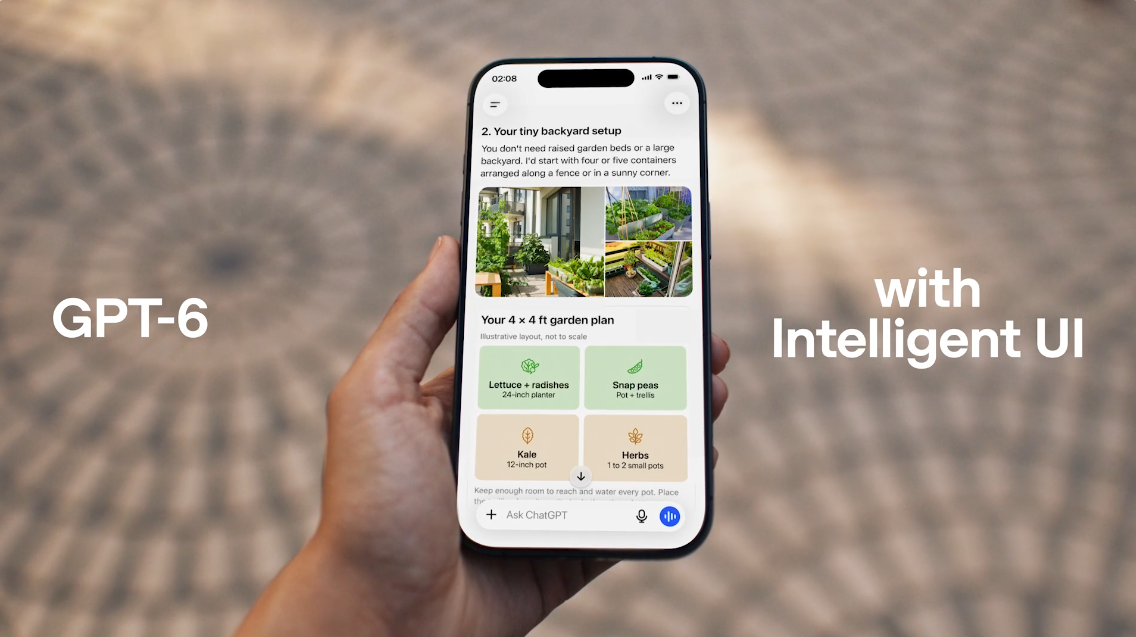
One of the biggest changes is Intelligent UI, announced by OpenAI on October 7, 2026.
Traditional chatbot responses usually follow a familiar pattern: you ask a question, and the AI replies with text. That approach works well for explanations, summaries, and general questions, but it is not always the best way to present information.
Imagine asking ChatGPT to explain compound interest. A conventional answer might give you a formula and a few examples. An interactive response could instead let you adjust the initial investment, interest rate, and investment period to see how the final amount changes.
The same idea can be applied to learning, planning, comparisons, and other everyday tasks.
Intelligent UI allows supported ChatGPT responses to combine text, visuals, and interactive elements when they are useful. The goal is to make information easier to explore rather than forcing users to understand everything through paragraphs.
What can Intelligent UI do?
Depending on the question and feature availability, it can help with:
- Visual explanations: Present information in a format that is easier to understand.
- Interactive learning: Make complex concepts easier to explore.
- Task-specific interfaces: Create interactive experiences directly within a conversation.
- More flexible answers: Combine explanations and visual elements instead of relying on text alone.
For students, this could make difficult subjects easier to explore. For professionals, it could simplify comparisons and planning. For everyday users, it could make answers more practical.
Importantly, Intelligent UI does not mean every response becomes an interactive application. Ordinary text answers remain available, and the interface depends on the question and supported features.
Official announcement: GPT-6 and Intelligent UI for everyone.
GPT-6 Is a Model Family, Not Just One Model
Another important development is the expansion of GPT-6 into multiple models designed for different kinds of work.
It is tempting to assume that a new model automatically replaces every earlier model. In practice, AI products often offer several options because speed, reasoning ability, cost, and workload requirements differ.
OpenAI introduced GPT-6 Astra in September 2026, followed by GPT-6 Sol and GPT-6 Luna later that month. GPT-6.1 Sol was introduced on September 29.
GPT-6 Astra
Astra is positioned for demanding work that benefits from deeper reasoning, coding, research, computer use, and complex multistep execution.
This is the type of model intended for work where producing a quick answer is not enough. A project might require examining several documents, comparing evidence, creating a structured report, and revising the result after receiving new instructions.
Astra is available through supported products and plans, with access depending on the particular offering.
GPT-6 Sol
Sol is designed to bring advanced capabilities to professional work while balancing performance and cost.
It is relevant to developers, analysts, researchers, and people who regularly use AI to solve technical or knowledge-intensive problems.
The GPT-6.1 Sol update followed soon after the initial GPT-6 family announcements, showing that model development continues even after a major release.
GPT-6 Luna
Luna is positioned as a faster, more affordable option for everyday use and applications that need to operate efficiently at scale.
This distinction matters because not every task requires the most capable model. Drafting a short email, summarizing a simple document, and working through a complicated technical problem place different demands on an AI system.
The broader direction is clear: users and developers are being offered different ways to balance capability, speed, and cost.
Read the official announcement: Introducing GPT-6 Sol and Luna.
ChatGPT Is Moving Beyond Answering Questions
For years, the main way people used ChatGPT was conversational. A person asked a question, received an answer, and decided what to do next.
That workflow is changing.
ChatGPT Work, introduced in July 2026, is designed to handle longer and more involved assignments. Rather than stopping at an explanation, it can research information, analyze files, work with supported connected applications, and produce deliverables.
These deliverables can include documents, spreadsheets, presentations, reports, and other work products.
Consider a small business owner preparing a monthly performance review.
The traditional approach might involve collecting information, copying numbers into a spreadsheet, drafting a report, and creating a presentation. An AI assistant can help with several of these stages, potentially bringing the work together into a more coherent workflow.
The user still needs to provide appropriate instructions, review the results, and approve important actions where required.
What makes this different?
The key difference is the focus on completing a sequence of related tasks rather than generating one response at a time.
For example, a research assignment could involve:
- Defining the research question and scope.
- Gathering information from appropriate sources.
- Comparing findings and identifying gaps.
- Organizing the results into a report.
- Revising the report when requirements change.
This is a more practical use of AI for people who need finished work rather than advice about how to produce it.
However, an AI-generated deliverable is not automatically correct. Figures, quotations, source links, calculations, and important conclusions still need verification.
Research Tools Are Becoming More Flexible
Research is one area where AI can save time, but it is also an area where mistakes can be costly.
A convincing explanation is not necessarily an accurate explanation. A research report can contain outdated information, incomplete evidence, or conclusions that go beyond what its sources establish.
OpenAI announced updates to ChatGPT’s deep research capabilities in February 2026, introducing more control over research plans and source selection.
Users can focus research on specific websites and a broader set of connected applications. They can also review and edit a research plan before the research begins, monitor progress, and adjust the direction of the work.
These features are particularly useful when the quality of the source material matters as much as the final answer.
Check out: WordPress AI Discovery Plugin
Why source control matters
Suppose you are researching a change to Google’s search ranking systems.
A useful research process should distinguish between:
- Official announcements explaining what changed.
- Independent reporting providing context.
- Expert commentary offering interpretation.
- Social media discussions expressing opinions.
- Unsupported claims that have not been independently verified.
These sources do not carry equal evidential weight.
Being able to focus research on trusted sources can make the process more transparent. It does not guarantee that every conclusion is correct, but it gives users more control over the evidence being considered.
For bloggers, developers, journalists, students, and business owners, this is a meaningful improvement in how research can be organized.
Scheduled Tasks Bring AI Into Recurring Work
Not every useful task requires a new conversation.
Some tasks need to happen repeatedly: reviewing changes, preparing summaries, tracking developments, or receiving reminders.
ChatGPT’s scheduled-task capabilities have been developed to support reminders, recurring work, and monitoring tasks.
For example, a user might want a regular summary of important developments in their industry. Another might need a reminder to review a project before a deadline.
A scheduled task can help reduce the need to remember every step manually.
The practical value comes from consistency. Instead of relying entirely on the user to return and repeat the same request, the system can run supported tasks on a schedule or monitor for specified changes.
Availability and limits depend on the plan and the task.
There is also an important distinction between monitoring and acting. Receiving an update about a change is different from authorizing an AI system to make changes to a website, send a message, or modify a business record. Higher-impact actions need appropriate permissions and human oversight.
Memory and Conversation Search Are Becoming More Useful
AI becomes more helpful when users do not have to explain the same background information repeatedly.
Memory can help ChatGPT maintain relevant context about a user’s preferences, ongoing work, and previously established details. OpenAI announced memory improvements in June 2026 intended to keep personalization more up to date.
The goal is to make future responses more relevant while reducing the impact of stale or contradictory information.
For example, someone who regularly asks for technical articles might prefer detailed explanations with examples. A developer working on a continuing project may benefit when relevant decisions and constraints remain available across conversations.
Memory is not the same as a perfect record of everything a person has ever said. Users should still check important details and review the memory controls available in their account.
Finding previous work
Another useful change arrived in July 2026, when ChatGPT expanded search across chats, projects, images, and documents on supported platforms.
This addresses a familiar problem: useful work can become difficult to find after dozens or hundreds of conversations.
Being able to locate previous research, uploaded documents, or project discussions makes ChatGPT more useful as an ongoing workspace rather than just a place for one-off questions.
Voice AI Is Becoming More Natural
Voice is another important part of the broader AI experience.
In July 2026, OpenAI introduced GPT-Live-1 for paid users and GPT-Live-1 mini for free users as part of its evolving ChatGPT Voice experience.
The models are designed to support more natural turn-taking, including listening and speaking at the same time. Spoken responses can appear alongside text, and supported experiences can use tools such as web search.
This makes voice interaction more useful for people who prefer speaking rather than typing.
Imagine preparing for an interview while walking, practicing a language through conversation, or talking through an idea before turning it into a written plan.
A more natural voice interface can make those tasks feel less like operating software and more like having a conversation.
That said, voice availability and capabilities vary across products and platforms. Not every voice experience supports every feature, and users should check the current capabilities of the version they use.
What Do These Changes Mean for Developers?
The GPT-6 developments matter beyond the ChatGPT interface.
Developers can build AI-powered applications using supported models and APIs, choosing options according to their requirements for capability, speed, cost, and workflow complexity.
The expanding model family creates more choices for applications that need different levels of intelligence.
A customer-support tool might prioritize speed and cost. A research application might prioritize careful reasoning and source analysis. A coding assistant might need to work through a complicated problem involving multiple files.
The right model depends on the task rather than on a model number alone.
Developers should also pay attention to API availability, pricing, rate limits, data handling, and model-specific capabilities. Features available in the ChatGPT interface do not necessarily work identically in the API.
For businesses, the opportunity is to build tools that solve specific problems instead of adding AI simply because it is available.
Is ChatGPT 6 More Accurate Than Earlier Versions?
Newer models can improve performance on particular tasks, but a new version number should not be treated as proof that every answer is correct.
AI performance depends on the question, available information, reasoning requirements, tools, and the quality of the evidence used.
A model might perform better at coding or multistep reasoning while still misunderstanding an ambiguous question or presenting an unsupported claim.
For important work, a sensible approach is to:
- Ask for sources when factual claims need verification.
- Open the cited sources and confirm they support the statements.
- Check dates, numbers, calculations, and quotations.
- Separate established facts from estimates and interpretations.
- Test generated code before deploying it.
- Review important decisions before taking action.
The real improvement should be measured by whether the model helps users complete tasks more reliably, not simply by how confident or polished its responses sound.
Does Everyone Have Access to the Same ChatGPT Features?
No. Model access and feature availability can differ by subscription, workspace permissions, device, and rollout status.
A feature announced by OpenAI may reach some users before others. Certain capabilities may be available in ChatGPT but not in the API, or on the web but not in an older desktop application.
Before concluding that a feature is missing, check the model selector, the relevant settings, the current release notes, and whether your app is up to date.
Users should also distinguish between a new model and a new product feature. GPT-6 is a model family; Intelligent UI, ChatGPT Work, scheduled tasks, and research tools describe capabilities or product experiences built around AI models.
Understanding this distinction makes product announcements much easier to interpret.
11. What Should Users Try First?
The best starting point depends on what you use ChatGPT for.
| If you use ChatGPT for… | Start with… |
|---|---|
| Learning and explanations | Intelligent UI and interactive responses |
| Blogging and content research | Deep research and source selection |
| Programming | A suitable coding-capable model and tested code workflows |
| Reports and business documents | ChatGPT Work, where available |
| Reminders and recurring updates | Scheduled tasks |
| Long-running projects | Memory and conversation search |
| Hands-free interaction | Supported ChatGPT Voice features |
| Building AI applications | The official API documentation and model-specific capabilities |
You do not need to use every new feature. Start with one recurring problem and see whether the available tools improve the result.
For example, if research takes too long, test a research workflow on a small topic and verify the citations. If you frequently lose track of previous work, try conversation search. If you prepare recurring reports, explore whether a supported Work workflow can reduce repetitive steps.
Measure the time saved and the quality of the final result.
12. What Comes Next for ChatGPT?
The direction of development points toward AI systems that combine reasoning, visual interfaces, tools, and longer-running workflows.
Instead of asking an AI system only for information, users are increasingly asking it to help turn information into something useful: a plan, a report, a working prototype, a comparison, or an organized set of next steps.
That does not mean traditional chat will disappear. Text remains one of the simplest and most effective ways to communicate.
The more likely change is that the interface becomes flexible enough to use text when text is best, visuals when visuals help, and interactive elements when users need to explore options.
For developers and businesses, this creates opportunities to rethink how people interact with software. For individuals, it could make advanced capabilities easier to access without requiring them to learn a complicated application first.
The challenge will be ensuring that greater autonomy is accompanied by reliability, transparency, privacy protections, and meaningful user control.
Frequently Asked Questions
What is new in ChatGPT 6?
GPT-6 introduces Intelligent UI, which can combine text, visuals, and interactive elements in supported responses. The wider GPT-6 ecosystem also includes models for different workloads, professional work capabilities, and continued improvements to research and other ChatGPT features.
Is GPT-6 available to everyone?
OpenAI has announced a global rollout, but specific models and capabilities vary by plan, workspace, and supported platform. Check your model selector and current official availability information.
What is GPT-6 Astra?
GPT-6 Astra is a high-capability model introduced in September 2026 for demanding work involving research, coding, computer use, and complex multistep tasks. Access depends on the supported product and subscription.
What is Intelligent UI in ChatGPT?
Intelligent UI allows supported ChatGPT responses to include visual and interactive elements alongside text. It can help users explore information and learn complex topics more easily.
Is ChatGPT becoming an AI agent?
ChatGPT is developing capabilities that support longer-running tasks, scheduled work, research, and the use of connected tools. The degree of autonomy depends on the feature, permissions, and product being used. It is not accurate to assume that every ChatGPT conversation operates as an autonomous agent.
Should I trust every answer from GPT-6?
No AI model should be treated as infallible. Verify important claims against reliable sources, especially for health, legal, financial, technical, and other consequential decisions.
Final Thoughts
The most important change after GPT-6 is not simply that a newer model exists. It is the broader shift toward AI that can present information interactively, support deeper research, work across tools, and help produce finished results.
For everyday users, that could mean more useful learning, planning, and productivity. For professionals and developers, it creates new ways to organize work and build applications.
But capability alone is not enough. Reliable sources, transparent limitations, privacy, and human judgment remain essential.
The best way to approach these updates is to experiment with the features available to you, verify important results, and focus on the tools that genuinely improve your work.