
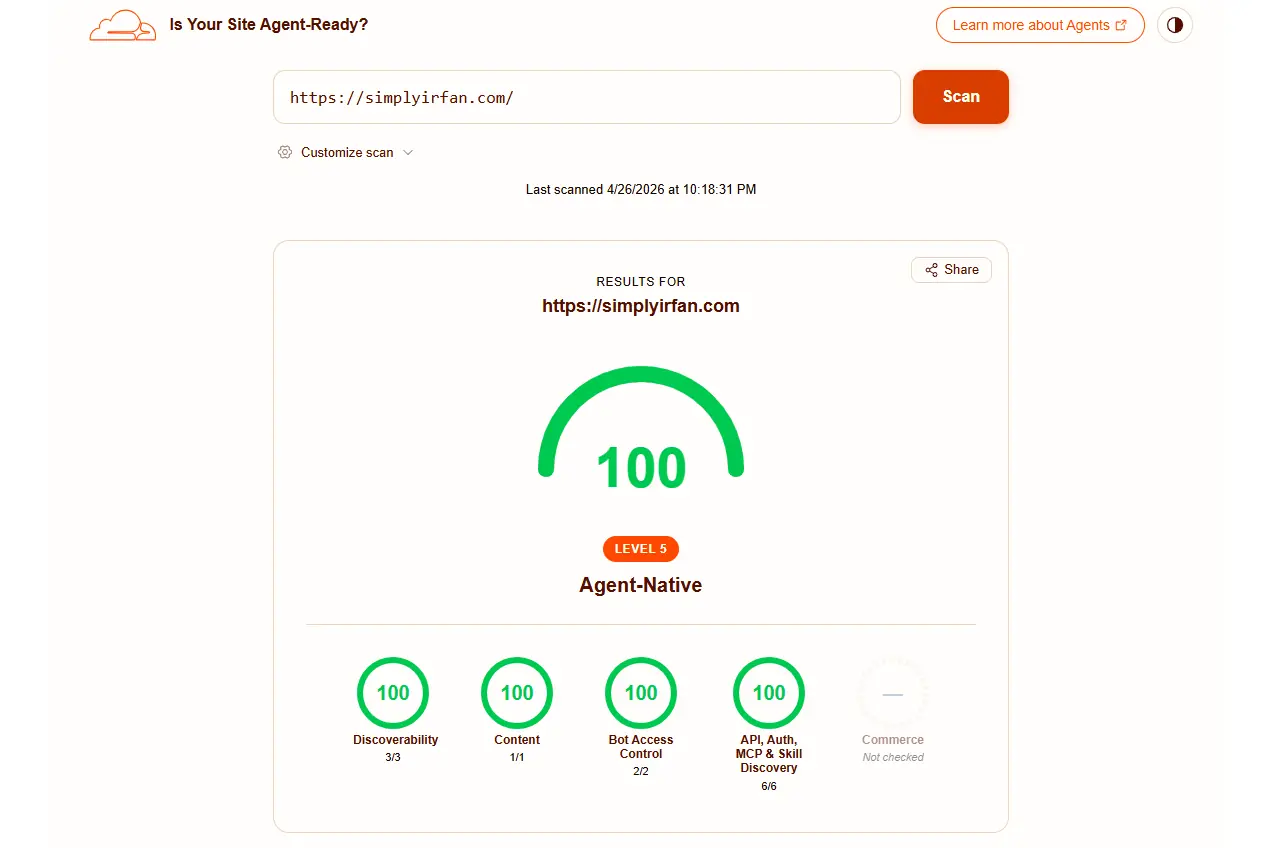
TL;DR: The AI Agent Ready Cheat Sheet
- Discoverability: Tell agents where to look using optimized
robots.txt, XML Sitemaps, and HTTP Link headers. - Content Format: Stop wasting AI context windows with heavy HTML. Serve lightweight Markdown (
Accept: text/markdown). - Bot Access Control: Set boundaries using Content Signals to explicitly state if your data can be used for AI training or just search retrieval.
- API & Skill Discovery: Publish
.well-knownendpoints so agents know exactly what tools your site offers. - Implementation: Bypass aggressive server caching (like Nginx FastCGI) to ensure AI requests actually reach your dynamic PHP endpoints.
Remember when optimizing a website just meant making sure Google could read your keywords? Those days are rapidly fading. We are stepping into an era where users don’t just browse sites; they dispatch AI agents to do the browsing, summarizing, and tool-executing for them.
Imagine you’ve spent months building an incredible suite of online tools—maybe a schema generator, an OCR scanner, or an image optimizer. A user tells their AI assistant, “Go generate a UTM link using that tool on my favorite site.” But the AI hits a wall. It gets tangled in heavy HTML, blocked by aggressive server caching, or gets lost looking for an API endpoint. Instead of a seamless execution, the AI gives up and throws an error.
Getting an “ai agent ready” status isn’t just a technical flex; it’s the new baseline for digital survival. Just as the benefits of social media marketing rely heavily on algorithms understanding and surfacing your content to the right humans, the future of web traffic relies on Large Language Models (LLMs) parsing your data without friction. If an AI agent can’t understand your site’s structure or discover your capabilities, you simply don’t exist in the AI ecosystem.
Let’s break down exactly how to bridge this gap. For each section, we will cover the strategy, and then provide the exact PHP code to implement it on a WordPress/Nginx stack.
Related: Can ChatGPT build a WordPress site?
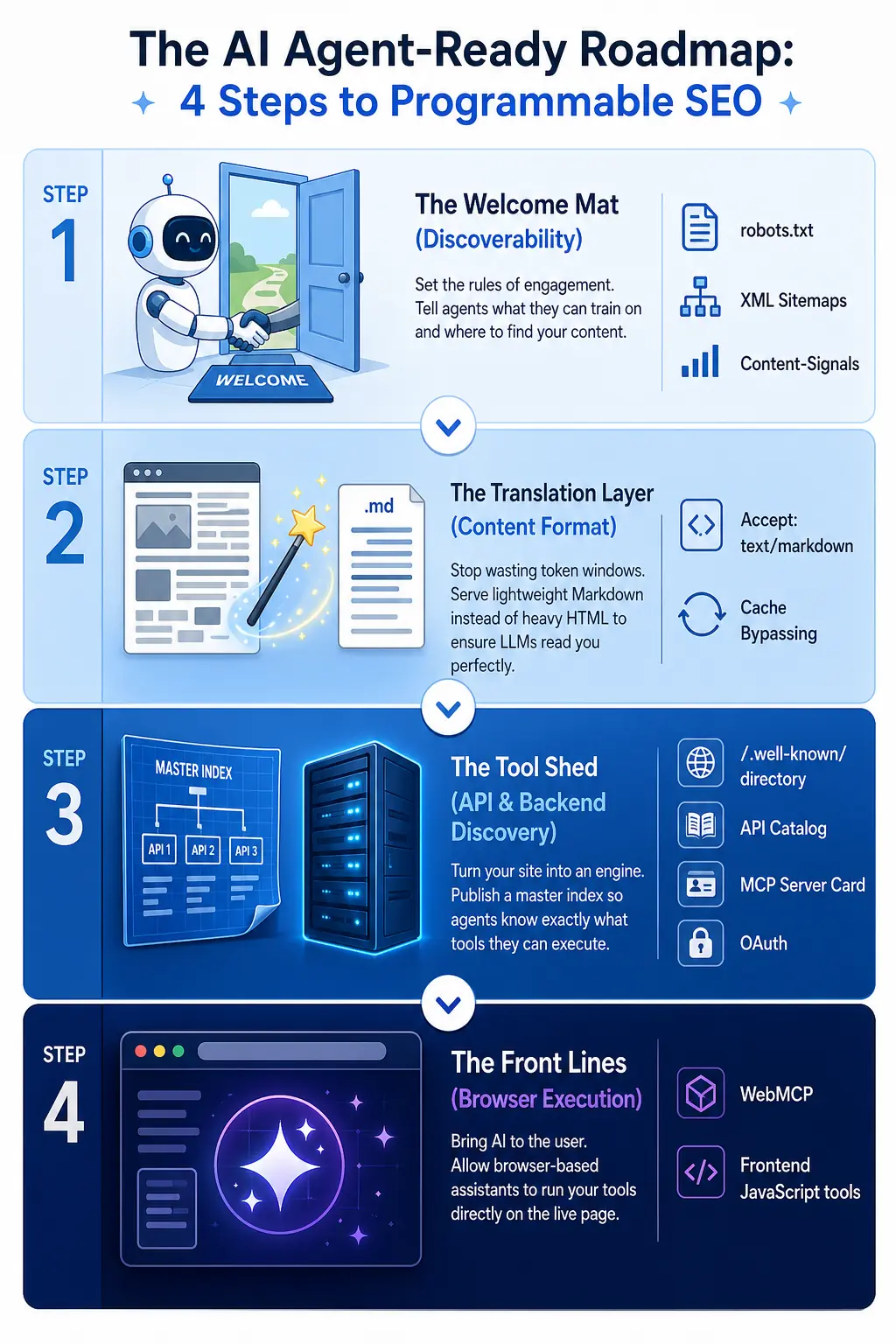
1. The Welcome Mat: Discoverability and Bot Access Control
Before an AI agent can interact with your custom tools or read your latest long-form guide, it has to find them and know the rules of engagement. Agents are polite but literal; if you don’t explicitly invite them in, they’ll leave.
The Strategy: Content Signals in Robots.txt
Your robots.txt is the bouncer at the door. Traditionally, you used it to keep bad bots out of your admin folders. Now, you need to use it to set the terms of service for AI. Maybe you want an AI to use your content to answer user questions (search), but you absolutely do not want your proprietary data ingested to train the next foundational model.
By adding Content Signals, you clearly state your boundaries.
The Developer Implementation
If you manage your site on WordPress, you can dynamically inject these signals into your virtual robots.txt file without touching the server files directly. Add this to your active theme’s functions.php:
PHP
add_filter( 'robots_txt', 'add_agent_content_signals', 10, 2 );

function add_agent_content_signals( $output, $public ) {
    // Define your Content Signals preferences
    // ai-train=no blocks model training, search=yes allows AI search engines
    $signals = "Content-Signal: ai-train=no, search=yes, ai-input=no\n\n";

    // Prepend it to the default WordPress robots.txt output
    return $signals . $output;
}
2. Speaking Their Language: Markdown Negotiation
Here is a hard truth: AI agents hate HTML. When an LLM looks at a standard webpage, it has to burn through thousands of valuable “tokens” just processing your navigation menus, footer widgets, CSS classes, and div tags.
The Strategy: Accept text/markdown
If you want to be truly AI agent ready, you need to support Content Negotiation. When a modern agent requests a page, it sends a header that says Accept: text/markdown. It is literally asking, “Can you just give me the raw, formatted text without the web design?”
If you use a network edge provider, finding out if Cloudflare Is Your Site Agent-Ready is easy—paid plans have a one-click toggle to handle this automatically. But if you are managing your own Nginx/WordPress stack, you have to code it yourself.
The Developer Implementation
This code intercepts the AI’s request, strips the heavy HTML, formats the headings, and returns pure Markdown. It also forces WordPress caching plugins to back off so the dynamic header actually works.
PHP
add_action( 'template_redirect', 'serve_markdown_for_agents_strict', 1 );

function serve_markdown_for_agents_strict() {
    // 1. Verify the AI Agent is asking for Markdown
    if ( isset( $_SERVER['HTTP_ACCEPT'] ) && stripos( $_SERVER['HTTP_ACCEPT'], 'text/markdown' ) !== false ) {

        // 2. Disable WordPress caching dynamically
        if ( ! defined( 'WP_CACHE' ) ) { define( 'WP_CACHE', false ); }
        if ( ! defined( 'DONOTCACHEPAGE' ) ) { define( 'DONOTCACHEPAGE', true ); }

        // 3. Strip standard WordPress HTML headers
        if ( ! headers_sent() ) {
            header_remove( 'Content-Type' );
            header_remove( 'Link' );
        }

        // 4. Generate the Markdown content
        if ( is_singular() ) {
            global $post;
            $title = "# " . get_the_title( $post->ID ) . "\n\n";
            $html = apply_filters( 'the_content', $post->post_content );

            // Basic regex to preserve headings and links
            $html = preg_replace( '/<h([1-6])[^>]*>(.*?)<\/h\1>/i', "\n## $2\n\n", $html );
            $html = preg_replace( '/<a[^>]*href="([^"]+)"[^>]*>(.*?)<\/a>/i', '[$2]($1)', $html );

            $markdown = wp_strip_all_tags( str_replace( array( '<br>', '</p>' ), "\n", $html ) );
            $content = $title . trim( $markdown );
        } else {
            $content = "# " . get_bloginfo( 'name' ) . "\n\n" . get_bloginfo( 'description' );
        }

        $tokens = ceil( strlen( $content ) / 4 );

        // 5. Send required headers and exit
        header( 'Content-Type: text/markdown; charset=utf-8' );
        header( 'Vary: Accept' );
        header( 'x-markdown-tokens: ' . $tokens );
        header( 'Cache-Control: no-store, no-cache, must-revalidate' );

        echo $content;
        exit;
    }
}
(Crucial Note: If you use Nginx FastCGI, you must update your Nginx Vhost fastcgi_cache_key to include $http_accept otherwise Nginx will just serve cached HTML).
3. The API and Skill Discovery Layer
This is where your website transitions from a passive brochure into an active, programmable engine.
The Strategy: The .well-known Directory
Instead of forcing an AI to guess how your site works, you publish specific JSON files in a .well-known directory that act as an instruction manual.
- API Catalog: Points the agent to your structured endpoints.
- OAuth Discovery: Tells the AI how to securely request an access token if your tools require a login.
- MCP Server Card: The Model Context Protocol (MCP) tells a cloud-based AI exactly how to connect to your site’s backend tools via Server-Sent Events (SSE).
- Agent Skills Index: The master directory of everything your site can do.
The Developer Implementation
To prevent cluttering your theme files, this single function handles every required discovery endpoint, ensuring they bypass cache and return strict JSON payloads.
PHP
add_action( 'init', 'serve_agent_well_known_endpoints', 1 );

function serve_agent_well_known_endpoints() {
    $request_uri = isset( $_SERVER['REQUEST_URI'] ) ? $_SERVER['REQUEST_URI'] : '';
    $base_url = home_url();

    // Setup strict headers to bypass cache and output JSON
    $enforce_json_headers = function( $content_type = 'application/json' ) {
        if ( ! defined( 'WP_CACHE' ) ) { define( 'WP_CACHE', false ); }
        if ( ! defined( 'DONOTCACHEPAGE' ) ) { define( 'DONOTCACHEPAGE', true ); }
        if ( ! headers_sent() ) {
            header_remove( 'Content-Type' );
            header_remove( 'Link' );
        }
        header( "Content-Type: {$content_type}; charset=utf-8" );
        header( 'Access-Control-Allow-Origin: *' );
        header( 'Cache-Control: public, max-age=86400' );
    };

    // 1. API Catalog (RFC 9727)
    if ( strpos( $request_uri, '/.well-known/api-catalog' ) !== false ) {
        $enforce_json_headers('application/linkset+json');
        echo wp_json_encode( array(
            'linkset' => array(
                array(
                    'anchor' => $base_url . '/wp-json/',
                    'service-desc' => array( array( 'href' => $base_url . '/wp-json/wp/v2/', 'type' => 'application/json' ) ),
                    'status' => array( array( 'href' => $base_url . '/wp-json/' ) )
                )
            )
        ), JSON_UNESCAPED_SLASHES );
        exit;
    }

    // 2. OAuth Discovery & Protected Resource
    if ( strpos( $request_uri, '/.well-known/oauth-authorization-server' ) !== false || strpos( $request_uri, '/.well-known/openid-configuration' ) !== false ) {
        $enforce_json_headers();
        echo wp_json_encode( array(
            'issuer' => $base_url,
            'authorization_endpoint' => $base_url . '/oauth/authorize',
            'token_endpoint' => $base_url . '/oauth/token',
            'scopes_supported' => array( 'read', 'write' ),
            'grant_types_supported' => array( 'authorization_code', 'client_credentials' )
        ), JSON_UNESCAPED_SLASHES );
        exit;
    }

    // 3. MCP Server Card
    if ( strpos( $request_uri, '/.well-known/mcp/server-card.json' ) !== false ) {
        $enforce_json_headers();
        echo wp_json_encode( array(
            'serverInfo' => array( 'name' => 'My Site MCP', 'version' => '1.0.0' ),
            'transport' => array( 'type' => 'sse', 'endpoint' => $base_url . '/mcp/sse' ),
            'capabilities' => array( 'tools' => array( 'listChanged' => false ), 'resources' => (object) array(), 'prompts' => (object) array() )
        ), JSON_UNESCAPED_SLASHES );
        exit;
    }

    // 4. Agent Skills Index (The Master Directory)
    if ( strpos( $request_uri, '/.well-known/agent-skills/index.json' ) !== false ) {
        $enforce_json_headers();
        echo wp_json_encode( array(
            '$schema' => 'https://agentskills.io/schema/index/v0.2.0.json',
            'skills' => array(
                array( 'name' => 'markdown-negotiation', 'type' => 'content-negotiation', 'url' => 'https://isitagentready.com/.well-known/agent-skills/markdown-negotiation/SKILL.md', 'digest' => 'sha256-' . hash('sha256', 'markdown') ),
                array( 'name' => 'api-catalog', 'type' => 'api', 'url' => $base_url . '/.well-known/api-catalog', 'digest' => 'sha256-' . hash('sha256', 'api') ),
                array( 'name' => 'mcp-server', 'type' => 'mcp', 'url' => $base_url . '/.well-known/mcp/server-card.json', 'digest' => 'sha256-' . hash('sha256', 'mcp') )
            )
        ), JSON_UNESCAPED_SLASHES | JSON_PRETTY_PRINT );
        exit;
    }
}
4. WebMCP: Browser-Based Agent Tools
The Strategy
WebMCP is the bleeding edge. It brings AI power directly into the user’s browser. By injecting specific JavaScript into your site’s header, you can expose your frontend tools (like a UTM generator or a calculator) to AI assistants living in Chrome extensions or the browser itself.
The Developer Implementation
This code hooks into wp_head to define a local JavaScript tool that the AI can trigger on behalf of the user.
PHP
add_action( 'wp_head', 'register_webmcp_tools', 1 );

function register_webmcp_tools() {
    ?>
    <script>
    // Execute immediately on page load to register the tool
    (function() {
        if (window.navigator && window.navigator.modelContext) {
            window.navigator.modelContext.provideContext({
                tools: [
                    {
                        name: "generate_utm_link",
                        description: "Generates a fully formatted UTM URL for campaign tracking.",
                        inputSchema: {
                            type: "object",
                            properties: {
                                url: { type: "string", description: "The base destination URL" },
                                source: { type: "string", description: "UTM Source (e.g., google)" },
                                medium: { type: "string", description: "UTM Medium (e.g., cpc)" }
                            },
                            required: ["url", "source", "medium"]
                        },
                        // The function the AI will execute locally in the browser
                        execute: async (args) => {
                            try {
                                const targetUrl = new URL(args.url);
                                targetUrl.searchParams.set('utm_source', args.source);
                                targetUrl.searchParams.set('utm_medium', args.medium);
                                return { content: [{ type: "text", text: targetUrl.toString() }] };
                            } catch (e) {
                                return { content: [{ type: "text", text: "Error: Invalid URL." }] };
                            }
                        }
                    }
                ]
            }).catch(console.error);
        }
    })();
    </script>
    <?php
}
Final Dev Step: After implementing these snippets, you must clear all caching layers (WP Rocket, Nginx FastCGI, and Cloudflare) or the tests will fail on old data.
Conclusion: The Future is Programmable
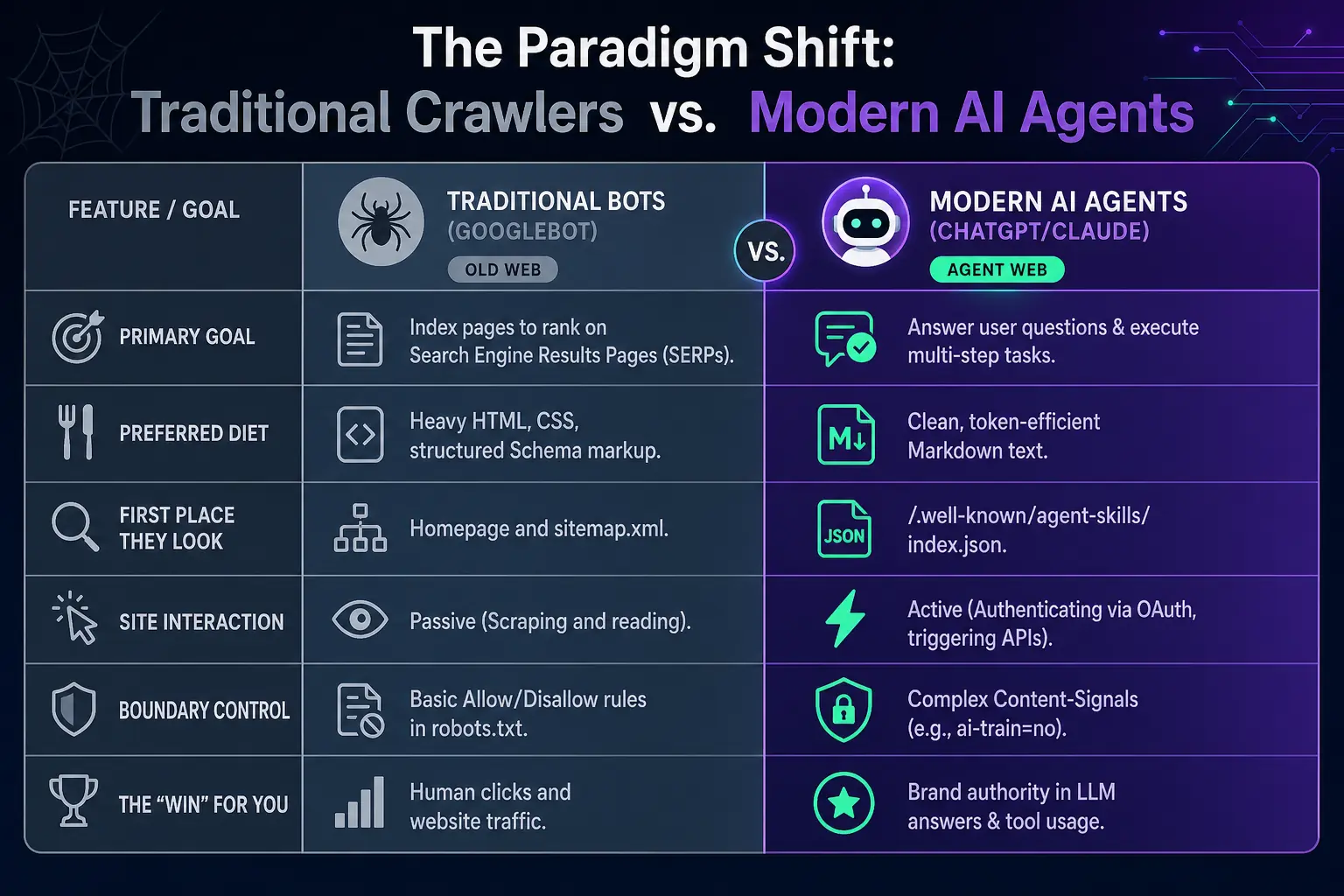
We are moving away from the traditional “search and click” internet. The future belongs to websites that act as seamless nodes in a massive, AI-driven network. Getting your site agent ready isn’t a one-time SEO trick; it is fundamentally upgrading your infrastructure to speak the language of the next generation of internet users.
By defining your boundaries with robots.txt, respecting context windows with Markdown negotiation, and explicitly declaring your capabilities through MCP and API catalogs, you ensure that your hard work doesn’t get lost in translation. Stop waiting for the bots to figure your site out. Give them the manual, open the right doors, and let the agents get to work.
Also Read: What’s new in ChatGPT 5
Frequently Asked Questions (FAQ)
What does it mean for a website to be AI agent ready?
Being agent ready means your website is technically configured to allow Artificial Intelligence bots to easily discover, read, and interact with your content and tools without wasting processing power on unnecessary web design code.
How do I use Cloudflare for agent readiness?
If you want to know if Cloudflare Is Your Site Agent-Ready, look at their edge network features. Paid Cloudflare plans have a toggle to automatically convert HTML to Markdown for AI agents, saving your origin server from doing the heavy lifting.
Why is Markdown better than HTML for LLMs?
LLMs process text using “tokens.” HTML contains massive amounts of formatting code (divs, classes) that eat up the LLM’s token limit without providing any actual information. Markdown provides the necessary structure using a fraction of the tokens.
What is an MCP Server Card?
An MCP (Model Context Protocol) Server Card is a JSON file hosted in your .well-known directory that tells AI agents exactly what tools your website offers and provides the specific endpoints required to execute them programmatically.